Break the Language Barrier on YouTube 🎬
That tutorial you need is in Korean. That documentary is in Japanese. That interview? French. The content you want to watch doesn't always speak your language.
Until now.
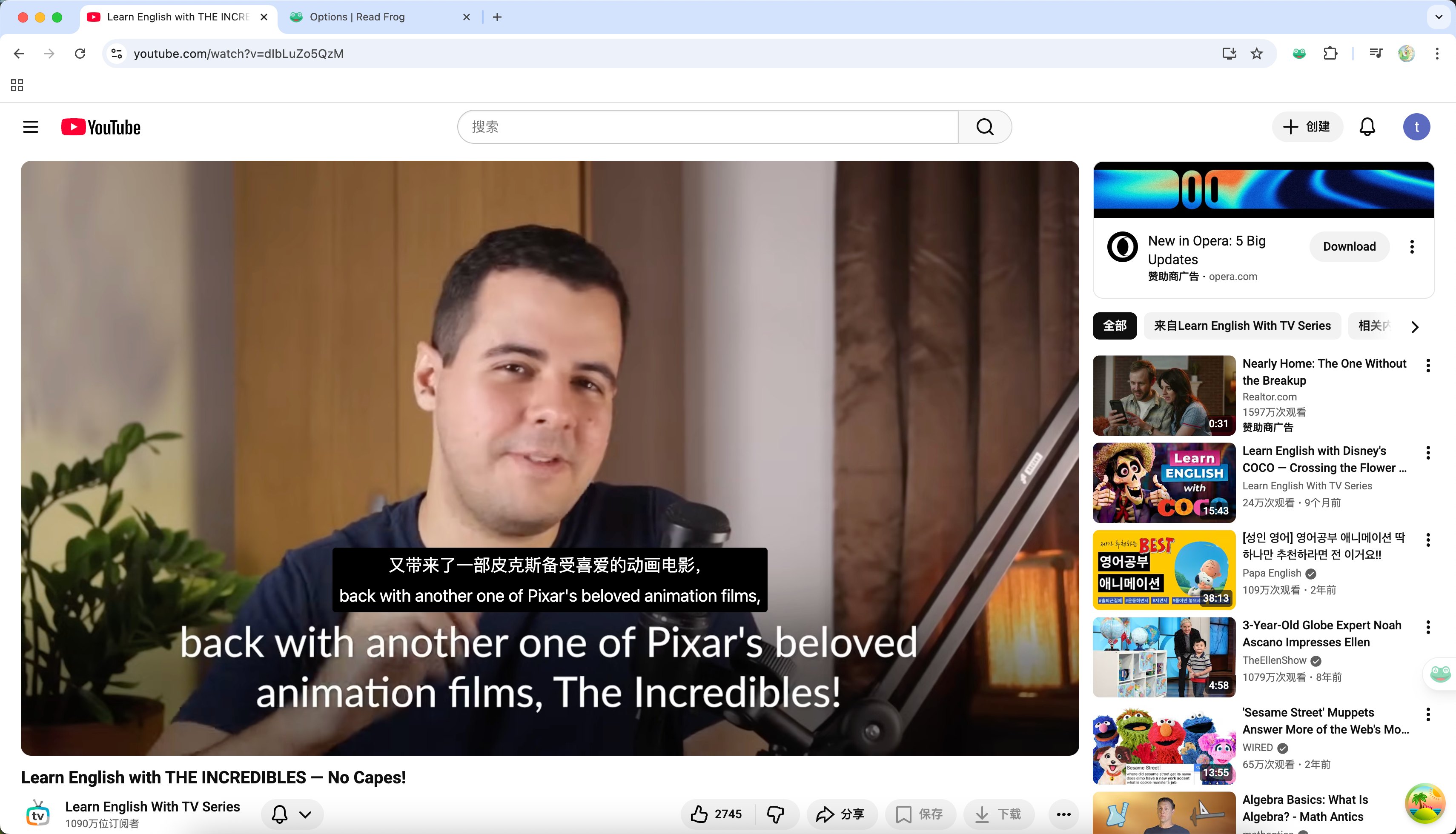
We're thrilled to announce Video Subtitles—a feature that brings real-time subtitle translation directly into your YouTube viewing experience. Watch any video with bilingual subtitles, customize the display to your liking, and never miss a word.
Public Beta: Video subtitles is now available to all users! Enable it in Options → Video Subtitles.
What's Inside This Update
This isn't just subtitle translation—it's a complete viewing experience designed around you:
| Feature | What It Does |
|---|---|
| Bilingual Display | See original and translation side by side |
| Display Modes | Original only, translation only, or both |
| Custom Styling | Font, size, color, weight—your choice |
| Draggable Position | Move subtitles anywhere on screen |
| Auto-Start | Translations begin when videos load |
| Smart Batching | Translates ahead, not all at once |
Three Display Modes
Choose how you want to see your subtitles:
Bilingual Mode
See both the original text and translation. Perfect for language learning—read the original while understanding through translation.
Original Only
Just the source language. Use this when you understand the language but want cleaner captions than YouTube's auto-generated ones.
Translation Only
Pure translation. When you just want to understand the content without distraction.
Language learners: Use bilingual mode with translation positioned above the original. Your eyes naturally read top-to-bottom, so you'll see the translation first, then connect it to the original text below.
Make It Yours: Full Customization
Subtitles should match your viewing style, not the other way around.
Text Styling
Customize separately for main subtitles and translations:
- Font Family: System fonts or custom choices
- Font Size: Scale from tiny to large
- Font Color: Any color you prefer
- Font Weight: Light to bold
Container Settings
- Background Opacity: From transparent to solid
- Translation Position: Above or below the original text
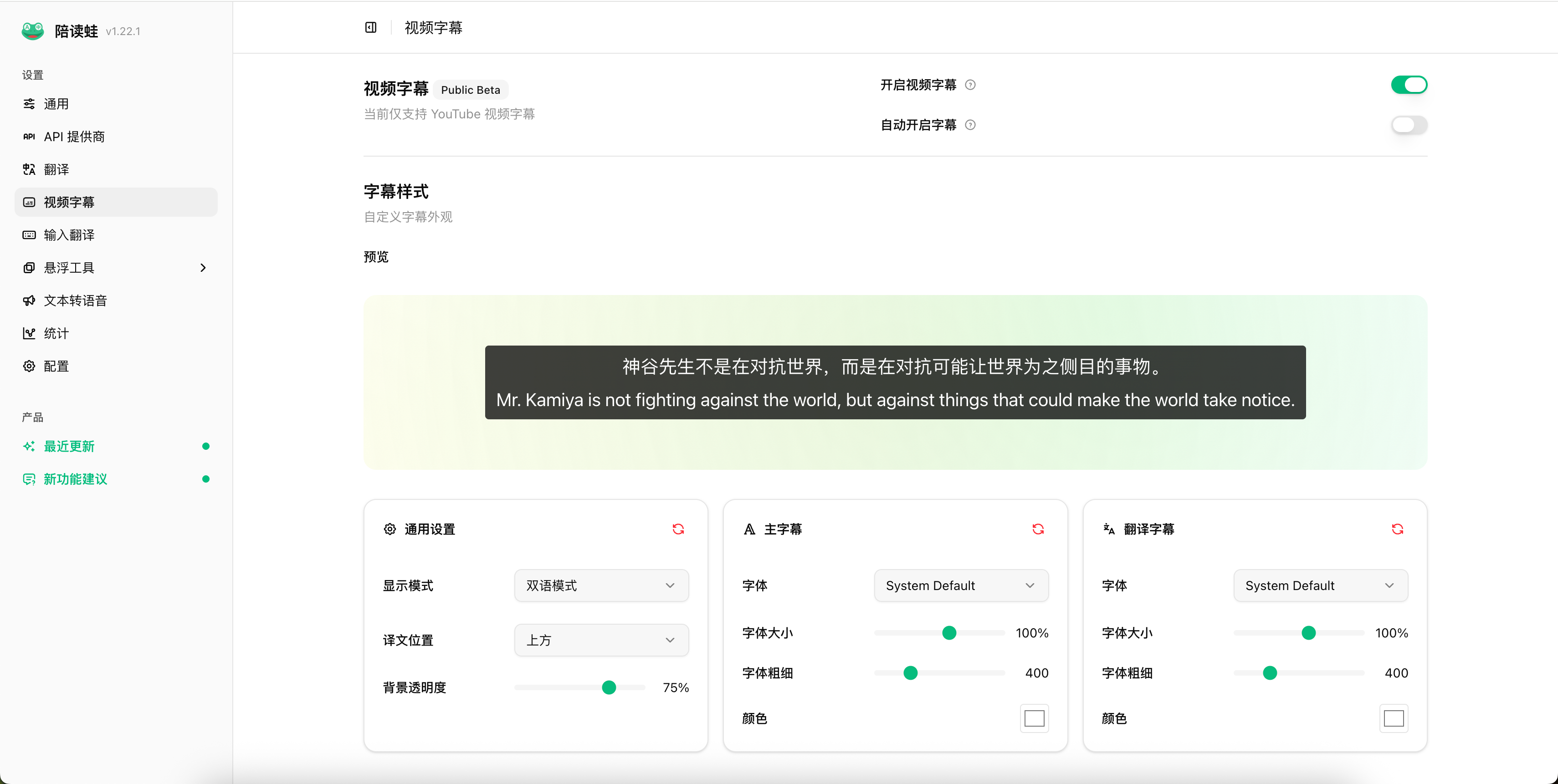
Every settings card has a Reset button. Experimented too much? One click returns to defaults.
Drag to Position
Subtitles blocking important content? Just drag them.
Hover over the subtitle area to reveal the drag handle, then move the subtitles anywhere vertically on the video. The position:
- Persists during playback
- Works in fullscreen mode
- Stays within video bounds
Smart Translation: Batch Processing
We don't translate all subtitles upfront—that would waste API tokens on videos you might not finish.
Instead, Read Frog uses intelligent batch pre-translation:
| When | What Happens |
|---|---|
| Video starts | First 50 seconds translated |
| Within 40s of next batch | Next 60s batch begins |
| User seeks ahead | Relevant batch translates immediately |
| Background | Silent translation, no loading states |
Token efficient: Only translates what you'll actually watch. Skip to the end? Those earlier batches stay untranslated.
Auto-Start Translation
Don't want to click the translate button every time?
Enable Auto-Start in settings, and subtitles automatically begin translating when you open a YouTube video. The translation runs silently in the background—you'll only see a "Processing" state if you jump to an untranslated section.

Better ASR Subtitle Segmentation
YouTube's auto-generated subtitles (ASR) often have awkward breaks:
Before:
"I think that"
"this is really"
"important because"
After:
"I think that this is really important because..."We improved the segmentation algorithm to:
- Accumulate text across events until natural sentence boundaries
- Handle CJK languages with character-based limits
- Add proper spacing for English when merging
- Support international punctuation (Chinese、Arabic، Hindi।)
International Support
Subtitles work across languages—not just English to your language, but any source to any target.
We've added support for sentence-ending punctuation in:
- Chinese: 。?!;
- Arabic: ؟
- Urdu: ۔
- Hindi: । ॥
- And more...
This means cleaner subtitle breaks regardless of the video's original language.
How to Get Started
1. Enable Video Subtitles
Go to Options → Video Subtitles and flip the toggle.
2. (Optional) Enable Auto-Start
Turn on auto-start if you want translations to begin automatically.
3. (Optional) Customize Your Style
Adjust display mode, fonts, colors, and positioning to your preference.
4. Watch a Video
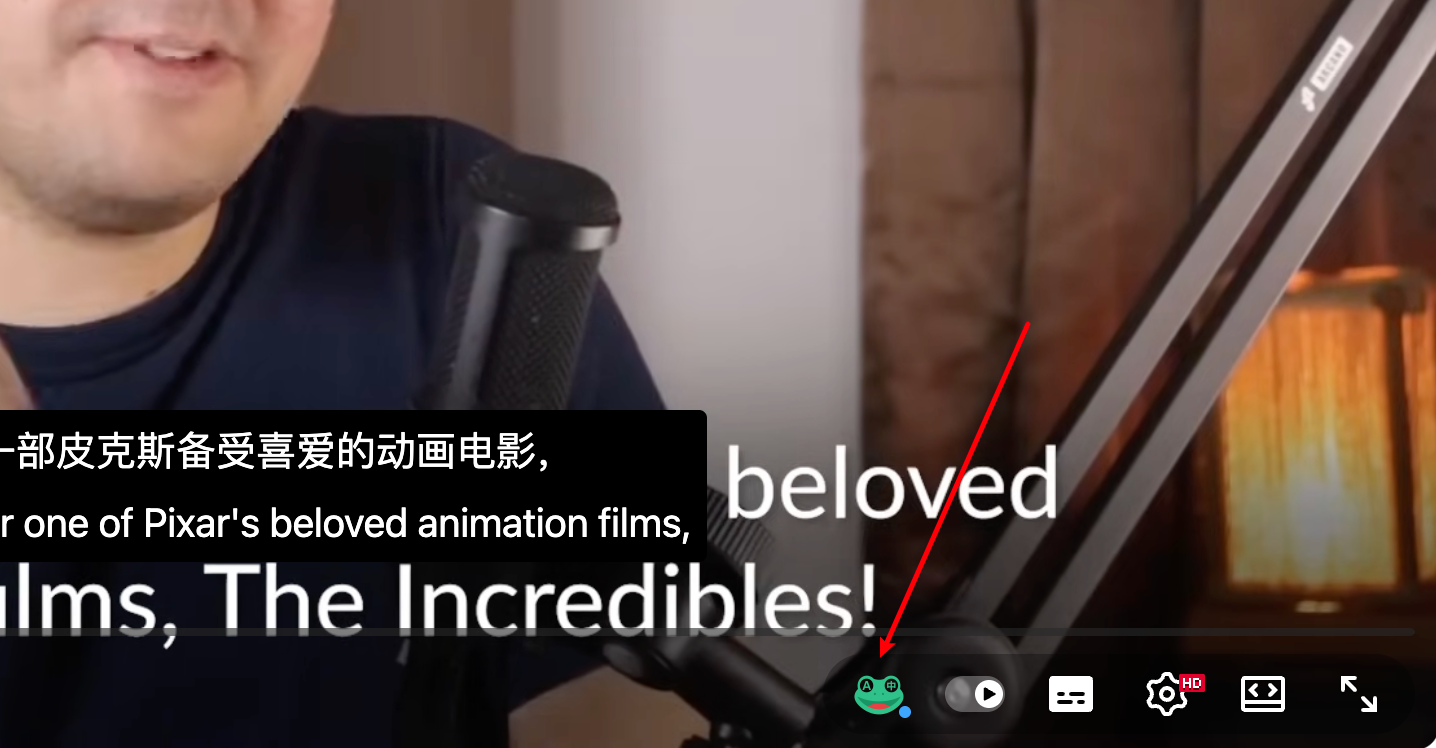
Navigate to any YouTube video. Click the Read Frog button in the player controls (or let auto-start handle it).
Supported Platforms
Currently supported:
- ✅ YouTube (all videos with available subtitles)
Coming soon:
- 🔜 Additional video platforms
Note: Video subtitles require the video to have subtitles available (either uploaded or auto-generated by YouTube).
Technical Highlights
For those curious about how it works:
- XHR Interception: Captures subtitle data directly from YouTube's API
- Multiple Formats: Supports standard, karaoke, and scrolling ASR captions
- Separate Queue: Video translations use their own processing queue, separate from article translations
- Shadow DOM: Subtitles render in isolation, preventing style conflicts
What's Next?
This is the public beta—we're just getting started:
- 🎨 More styling options (outlines, shadows)
- 🌐 Additional video platforms
- 📝 Subtitle export functionality
- 🔊 Combined with TTS for audio translation
Try It Now
Update to the latest version of Read Frog and experience YouTube in any language.
Found a bug? Have a suggestion? Share your feedback on GitHub Issues—your input shapes what we build next.
Happy watching! 🎬
Written by
taiiiyang
At
Thu Jan 15 2026
Extension Version
1.22.1