
Request Control & Batch Translation
Understand Read Frog's Token Bucket, burst requests, LLM batching, retries, fallback, and conservative settings for low-quota APIs.
Open Options → Translation → Request Control to tune webpage request pacing. Video subtitles have an independent copy of these settings under Options → Video Subtitles.
Defaults at a glance
| Setting | Default | Applies to |
|---|---|---|
| Average Requests Per Second | 8 | All provider requests in that translation flow |
| Maximum Burst Request Count | 60 | All provider requests in that translation flow |
| Maximum Characters Per Batch | 1000 | LLM providers only |
| Maximum Paragraphs Per Batch | 4 | LLM providers only |
How the Token Bucket works
Read Frog uses a continuously refilled Token Bucket:
- The bucket starts full with Maximum Burst Request Count tokens.
- Starting one queued request consumes one token.
- Average Requests Per Second adds tokens continuously until the bucket is full again.
- Whenever tokens are available, due requests can start.
This distinction matters: burst capacity is not a concurrency limit. With the default capacity of 60, a fresh bucket may immediately release up to 60 queued requests. The system does not promise that only 60 network requests will be in flight at once.
Decimal rates are valid. A rate of 0.25 adds one token every four seconds; 0.5 adds one every two seconds.
Do not copy a provider's “requests per minute” number directly into the per-second field. Divide it by 60, then consider whether that provider also limits short bursts.
Choosing rate and burst capacity
Match the sustained rate first, then choose how much initial traffic the provider accepts.
| Provider quota example | Conservative starting point |
|---|---|
| 60 requests/minute, no documented burst | rate 1, capacity 1 |
| 15 requests/minute | rate 0.25, capacity 1 |
| 1 request every 10 seconds | rate 0.1, capacity 1 |
| High-throughput local model | keep 8 / 60, then tune after observing latency and memory |
If you receive HTTP 429 or quota errors, set capacity to 1 first and lower the rate to the provider's sustained limit. Increasing batching may reduce request count for LLMs, but it does not make an excessive burst safe.
When LLM batching runs
Batch translation is used only when the selected provider is recognized as an LLM provider. Ordinary translation services continue sending their normal requests even when batch limits are visible.
Compatible items share a batch when they have the same provider, source language, target language, and context. A batch is sent when any of these happens:
- adding another item would exceed the character limit;
- the paragraph/segment count reaches its limit;
- the character count reaches its limit;
- the short collection window (about
100ms) expires.
The 1000-character and 4-paragraph defaults balance request savings with predictable structured output. Larger batches can lower request overhead, but a slow or malformed result affects more paragraphs and may exceed a model or gateway limit.
Structured results, retries, and fallback
Read Frog expects one translated result for each source item in an LLM batch. If the model returns the wrong number of items, Read Frog retries that malformed batch up to three times, then falls back to individual translations for those items. Normal request failures are also handled by the request queue's retry policy; they are not the same as a batch-count mismatch.
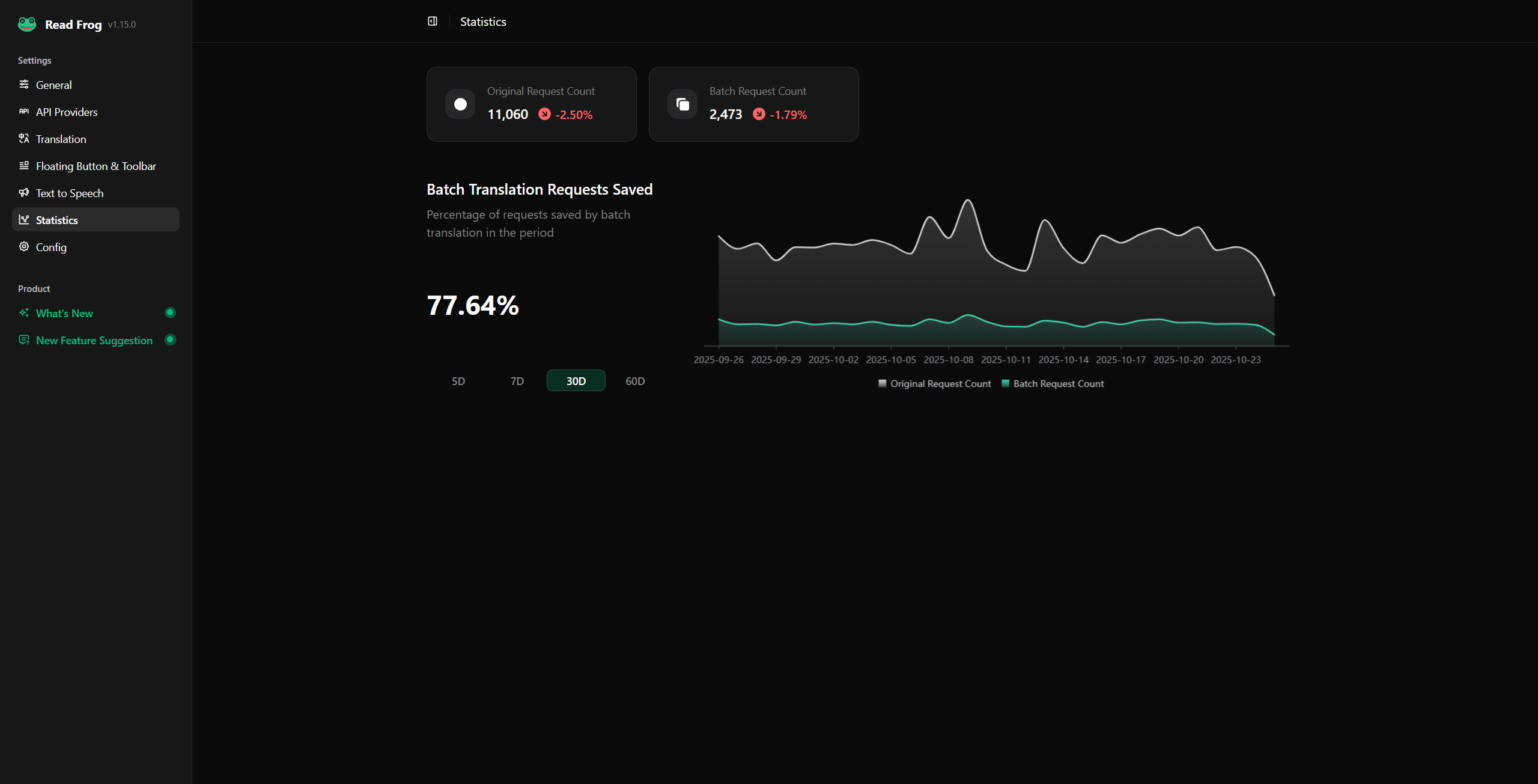
Duplicate in-flight items are deduplicated, and successful translations can be reused from cache. The Statistics page compares original paragraph requests with actual batched requests so you can confirm whether batching helps on your sites.
Practical presets
Strict free tier
- rate: the provider's documented per-second rate, often
0.1–1; - burst capacity:
1; - maximum characters:
600–1000; - maximum paragraphs:
2–4.
Fragile structured-output model
Keep rate within quota, then reduce batches to 500–800 characters and 2 paragraphs. This trades request savings for more reliable one-to-one output.
Fast local model
Start with the defaults. Increase batch size gradually while watching response time, memory use, and malformed batch fallbacks. A large burst can still overload a local server even when no remote quota exists.
Page and subtitle settings are separate
Page translation and video subtitles do not share a bucket or batch configuration. Tune each workload under its own settings page. Subtitle traffic is often more time-sensitive, while webpage translation can tolerate a slower conservative rate.