Sync Your Settings Across Devices - Never Reconfigure Again 🔄
Tired of setting up Read Frog on every new device? Wishing your API keys, translation preferences, and custom settings could just... follow you?
Your wish is granted.
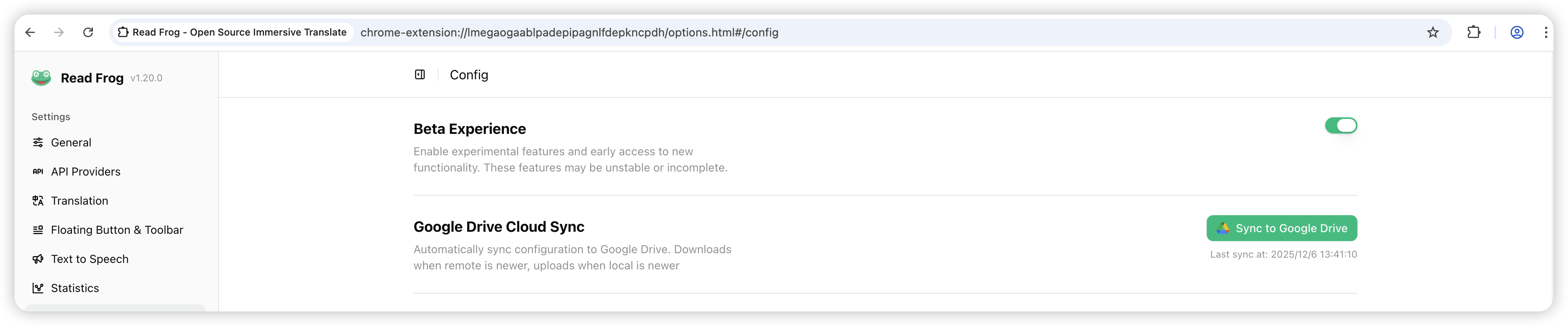
We're thrilled to introduce Google Drive Configuration Sync - your settings, everywhere you go. One-click sync. Zero hassle.
The Problem We're Solving 💡
You're a power user. You've carefully configured:
- 🗝️ API keys for multiple providers
- 🎨 Translation preferences - your perfect settings
- ⚙️ Custom configurations - painstakingly tuned
- 🎯 Feature toggles - exactly how you like them
Then you get a new laptop. Or switch browsers. Or reinstall the extension.
Everything is gone. Back to square one. Again.
The Reality: Most users configure Read Frog once and forget. But when they need to set it up again? It's frustrating, time-consuming, and error-prone.
The Solution: One-Click Sync 🚀
With Google Drive Configuration Sync, your entire Read Frog configuration lives in the cloud - securely stored, automatically synced, always available.
How It Works
| Before Sync | With Sync |
|---|---|
| Configure on each device manually | Configure once, sync everywhere |
| Re-enter API keys every time | Keys sync automatically |
| Lose settings on reinstall | Settings never lost |
| Different configs per device | Same config everywhere |
| Hours of setup time | Seconds to sync |
Smart Sync Logic
Read Frog is intelligent about when to sync:
- 📤 Local is newer? → Uploads to Google Drive
- 📥 Remote is newer? → Downloads to your device
- 🤝 Both changed? → Detects conflicts and helps you resolve them
- ⚡ No changes? → Skips sync (fast and efficient)
Smart Merging: When both your devices have changes but they don't conflict, Read Frog automatically merges them. No action needed!
Key Features ✨
🔐 Secure & Private
- OAuth authentication - Uses Google's secure login system
- appDataFolder storage - Your config file is hidden from your regular Drive files
- Local encryption - Your API keys remain protected
- No third-party servers - Direct connection between your extension and Google Drive
Privacy First: Your configuration is stored in Google Drive's appDataFolder, which is only accessible to Read Frog. Even you can't see it in your regular Drive view - it's completely private.
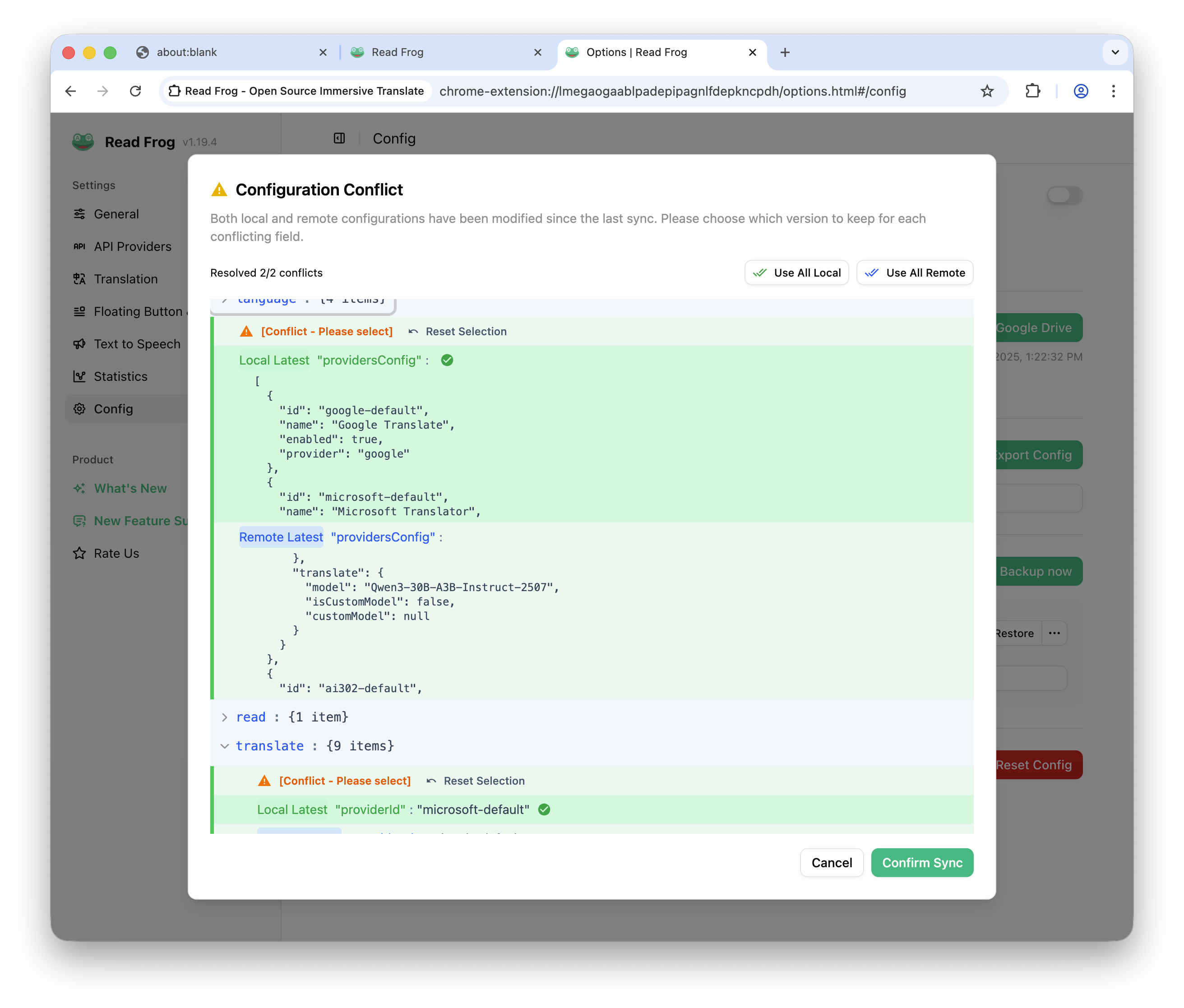
🎯 Intelligent Conflict Resolution
When both devices have changes, Read Frog doesn't just overwrite. It's smarter:
- Auto-detect conflicts - Compares your local and remote configurations
- Visual conflict dialog - See exactly what's different
- Field-level resolution - Choose which version to keep for each setting
- Bulk operations - "Use all local" or "Use all remote" options
📦 Schema Migration
Worried about compatibility when Read Frog updates? Don't be.
- Automatic schema migration - Old configs upgrade seamlessly
- Validation - Ensures your sync always works
- Backward compatible - Won't break existing configurations
How to Enable & Use 🎮
Getting started takes less than 2 minutes:
Step 1: First-Time Setup
- Open Read Frog Settings (Click extension icon → Options)
- Navigate to "Google Drive Sync" section
- Click "Sync" button
- Authorize Google Drive access - A popup will appear for Google OAuth
- Grant permissions - Click "Allow" to let Read Frog access your Drive
First Sync Logic: On first sync, Read Frog intelligently handles the situation:
- If remote config exists → Downloads and applies the remote configuration
- If no remote config exists → Uploads your local configuration to Google Drive
This means if you've already synced on another device, your new device will automatically get those settings!
Step 2: Sync on Other Devices
Once synced on one device, sync everywhere:
- Open Settings on your new device
- Click "Sync" button
- Authorize (if not already done)
- Done! Your settings appear automatically
Step 3: Ongoing Sync
After the initial setup, syncing is effortless:
- Manual sync - Click "Sync" whenever you want
- Last sync time - Always visible, so you know when you last synced
- Success/Error toasts - Clear feedback on every action
Real-World Use Cases 🌟
🏠 Home & Office
Scenario: You use Read Frog on your home computer and work laptop.
With Sync:
- Configure once at home
- Sync at work
- Settings identical on both devices
- Change something? Sync and it's everywhere
Without Sync:
- Configure twice (tedious)
- Settings might drift apart
- Updates need to be done twice
🎓 Student Life
Scenario: You switch between university computers, personal laptop, and home desktop.
With Sync:
- Configure once
- Any computer you use = same settings
- No time wasted on setup
🔄 Device Upgrades
Scenario: You're upgrading to a new laptop.
With Sync:
- Install Read Frog on new laptop
- Click sync
- Everything works immediately
Without Sync:
- Remember all your settings
- Re-enter API keys
- Reconfigure preferences
- Hope you didn't forget anything
Conflict Resolution Made Easy 🛠️
Conflicts happen. Read Frog makes resolving them simple:
When Conflicts Occur
Conflicts are detected when:
- ✅ You changed settings on Device A
- ✅ You changed different settings on Device B
- ✅ Both devices haven't synced yet
The Resolution Process
- Conflict dialog appears automatically
- View the differences in a clear JSON tree format
- Choose per field:
- Use local version
- Use remote version
Pro Tips for Conflict Resolution
Time-Saving Shortcuts: Use "Select All Local" or "Select All Remote" buttons when one version is clearly better.
- Review before resolving - See exactly what changed
- Bulk actions available - Don't click through dozens of fields
- Reset selections - Start over if you made a mistake
- Progress indicator - See your resolution progress
What Gets Synced? 📋
Your entire Read Frog configuration:
| Category | What's Included |
|---|---|
| API Keys | All provider keys (OpenAI, Claude, Gemini, etc.) |
| Translation Settings | Language preferences, batch settings |
| UI Preferences | Theme, display options |
| Feature Toggles | Beta features, enabled/disabled features |
| Custom Configurations | Any custom settings you've configured |
What's NOT Synced: Your translation history and statistics stay local for privacy. Only your configuration syncs.
Security & Privacy 🔒
We take your data seriously:
Where Your Data Lives
- ✅ Google Drive appDataFolder - Hidden, private folder
- ✅ OAuth protected - Only you can authorize access
- ✅ Local encryption - API keys are protected
- ✅ No server storage - Direct connection to Google
What Read Frog Can Access
- ✅ Only the config file - No access to other Drive files
- ✅ Limited scope - Only what's needed for sync
- ✅ Your control - Revoke access anytime via Google Account settings
Best Practices
- 🔐 Keep your Google Account secure
- 🔄 Sync regularly to avoid large conflicts
- 🗑️ Revoke access if you uninstall Read Frog permanently
Troubleshooting 💡
Sync Button Not Working?
- Check internet connection - Sync requires online access
- Re-authorize - Sometimes OAuth tokens expire, click sync to refresh
- Check browser permissions - Ensure Read Frog has necessary permissions
Conflicts Not Resolving?
- Review carefully - Make sure you understand what changed
- Start fresh - Reset selections and try again
- Contact support - If you're stuck, open an issue
Settings Not Appearing After Sync?
- Refresh the page - Settings might need a page reload
- Check sync status - Ensure sync completed successfully
- Try syncing again - Sometimes a second sync resolves issues
Can't Find Settings? Make sure you've synced from a device that has the settings you want. The sync pulls from Google Drive, so the source device must have synced first.
Performance & Reliability ⚡
Speed
- Quick syncs - Usually completes in 1-3 seconds
- Incremental updates - Only changed data transfers
- Background friendly - Doesn't block your browsing
Reliability
- Error handling - Clear error messages if something goes wrong
- Retry logic - Automatic retries for transient failures
- Validation - Configs are validated before applying
Storage
- Minimal footprint - Config files are small (typically < 100KB)
- No quota concerns - Uses negligible Google Drive space
- Automatic cleanup - Old sync metadata is cleaned up
What's Next? 🔮
Google Drive Sync is just the beginning. We're exploring:
- 🌐 Multi-cloud support - Sync to other cloud providers
- ⏰ Automatic sync - Background sync when changes occur
- 📱 Mobile support - Sync to mobile extensions
- 🔄 Sync history - View and restore previous configurations
- 👥 Team sharing - Share configurations with team members (optional)
Have Ideas? Share your suggestions - we're always looking to improve the sync experience!
Start Syncing Today 🚀
Ready to never reconfigure again?
- ✅ Update Read Frog to the latest version
- ✅ Open Settings → Google Drive Sync
- ✅ Click "Sync" and authorize
- ✅ Enjoy seamless settings across all devices
Real User Impact 🌟
Here's what users are saying:
Before Google Drive Sync:
- 😫 "I have to set up Read Frog every time I switch devices"
- ⏱️ "Takes 10-15 minutes to configure everything"
- 🔑 "I always forget some API key or setting"
- 😤 "Different settings on different devices confuse me"
After Google Drive Sync:
- ✅ "One click and all my settings are there"
- ⚡ "Setup takes 30 seconds now"
- 🎯 "My configuration is consistent everywhere"
- 😊 "I can focus on using Read Frog, not configuring it"
The Bottom Line 💰
Time is money. Reconfiguring settings isn't just annoying - it's wasteful.
Google Drive Configuration Sync saves you:
- ⏱️ Time - No more repetitive setup
- 🧠 Mental energy - No more remembering configurations
- 😊 Frustration - No more "where did that setting go?"
- ✅ Consistency - Same experience everywhere
One configuration. Infinite devices. Zero hassle.
Happy syncing! 🐸
P.S. - Have questions or feedback about sync? Join our Discord or open a GitHub issue. We'd love to hear from you!
Written by
Yukiniro
At
Sun Dec 07 2025
Extension Version
1.20.1