Your Personal Translation Lab is Here 🧪
You've configured multiple AI providers in Read Frog. But which one translates that particular sentence best? Until now, you'd have to switch providers, translate, compare, switch again...
Not anymore.
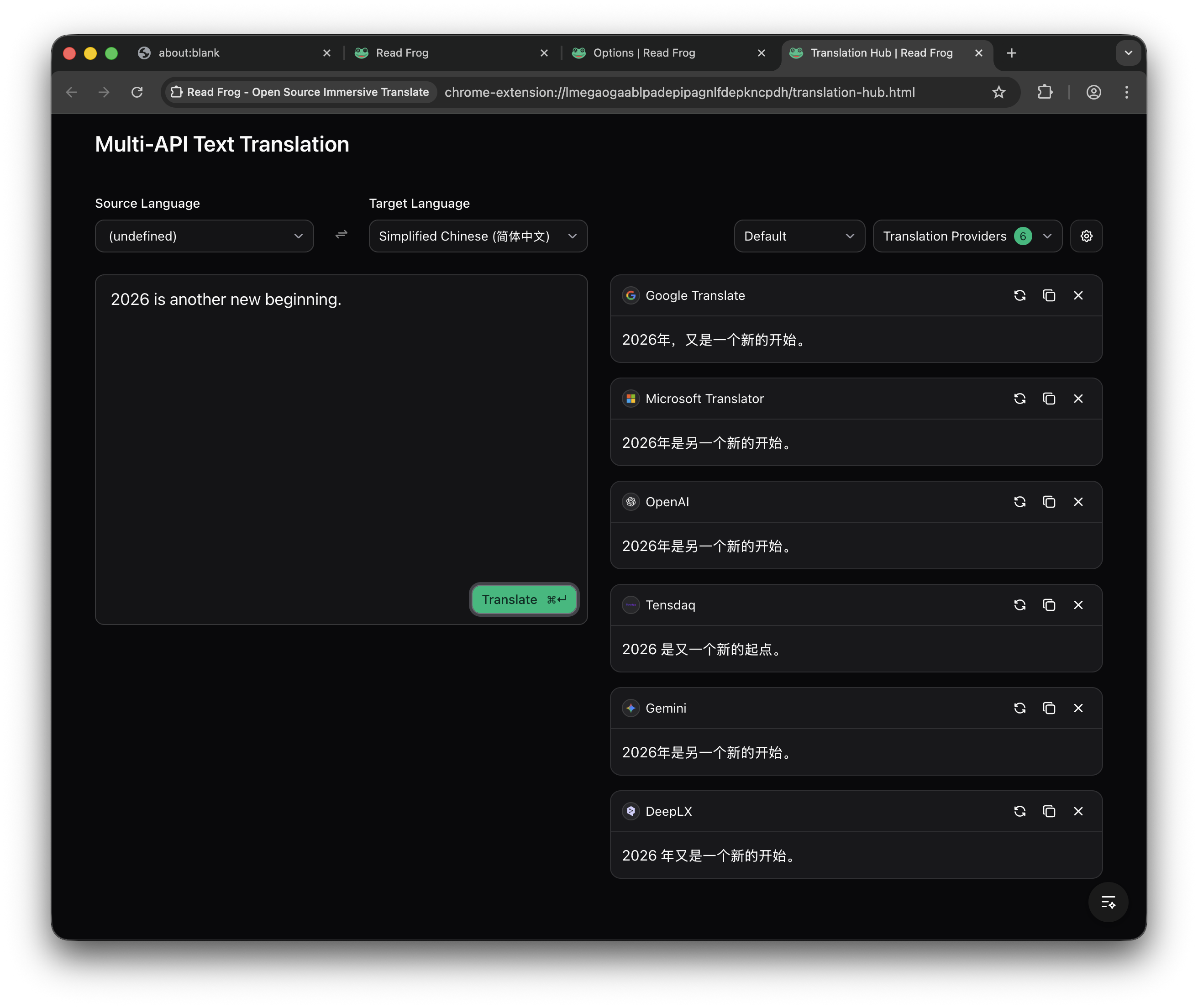
Introducing Translation Hub — a dedicated translation workspace where you can send the same text to multiple AI models at once and compare results instantly.
Why Compare Translations?
Different AI models have different strengths. Some excel at casual conversation, others at technical jargon, and some nail literary prose. The "best" translation depends entirely on what you're reading.
Fun fact: We've seen cases where one provider perfectly captures the tone of an article, while another produces a more accurate but less natural translation. Now you can see both and choose for yourself.
| Scenario | What Happens |
|---|---|
| Reading a novel | One model captures the emotion, another is more literal — you pick |
| Technical documentation | Compare precision across models to find the most accurate one |
| Casual social media | See which model sounds most natural in your language |
| Learning a language | Cross-reference translations to deepen your understanding |
How It Works
Translation Hub opens in its own browser tab — a clean, distraction-free workspace built for focused translation work.
1. Open Translation Hub
Click the Translation Hub button in the Read Frog popup. It opens in a new tab with a clean, two-column layout.
2. Select Your Providers
Use the provider dropdown to choose which AI models you want to compare. Pick two, three, or as many as you've configured.
Pro tip: Try pairing a premium model (like GPT-4o or Claude) with a free or local model (like Ollama) to see if the cheaper option works just as well for your content.
3. Type or Paste, Then Translate
Enter your text in the input area and hit Translate (or press Cmd/Ctrl + Enter for a quick shortcut). All selected providers translate simultaneously.
4. Compare and Act
Each translation appears in its own card. You can:
- Copy any translation with one click
- Retry a specific provider if something looks off
- Remove cards you don't need
| Feature | What It Does |
|---|---|
| Auto Language Detection | Detects the source language automatically — no manual selection needed |
| Language Swap | One-click button to swap source and target languages |
| Custom Prompts | Apply your personalized translation prompts for tailored results |
| Provider Selection | Choose any combination of your configured providers |
Perfect For 🎯
🎓 Language Learners Compare translations to understand nuances between providers. See how different models interpret idioms, slang, and cultural references.
📝 Writers & Translators Use multiple AI perspectives as a starting point. Cross-reference translations to find the most natural phrasing.
💼 Professionals Quickly verify critical translations by checking them across multiple models before using them in important documents.
🔬 AI Enthusiasts Curious how different models perform? Translation Hub is a playground for comparing AI capabilities in real-time.
Smart Details That Matter
Keyboard shortcut: Press Cmd/Ctrl + Enter to translate instantly — no need to reach for the
button.
Translation Hub integrates seamlessly with your existing Read Frog setup:
- Uses your existing API keys — no additional configuration needed
- Respects your custom prompts — select a prompt from the dropdown to apply your personalized translation style
- Supports 300+ languages — with a searchable language selector to find any language quickly
- Auto-detects source language — powered by AI, so you can paste text in any language and it just works
What's Next? 🔮
Translation Hub is just the beginning. We're exploring:
- 📊 Translation quality scoring — AI-powered comparison of translation accuracy
- 📋 Translation history — Save and revisit your past translations
- 🔗 Quick access from page translation — Send any translated text directly to Translation Hub for deeper comparison
Have ideas? Join our Discord and let us know what features you'd love to see in Translation Hub.
Try It Now 🚀
Update to Read Frog v1.25.0 and click the Translation Hub button in your popup. It's that simple.
Whether you're a language learner comparing nuances, a professional double-checking critical translations, or just curious about how different AI models perform — Translation Hub has you covered.
Happy translating! 🐸
Written by
MengXi
At
Fri Feb 06 2026
Extension Version
1.25.0