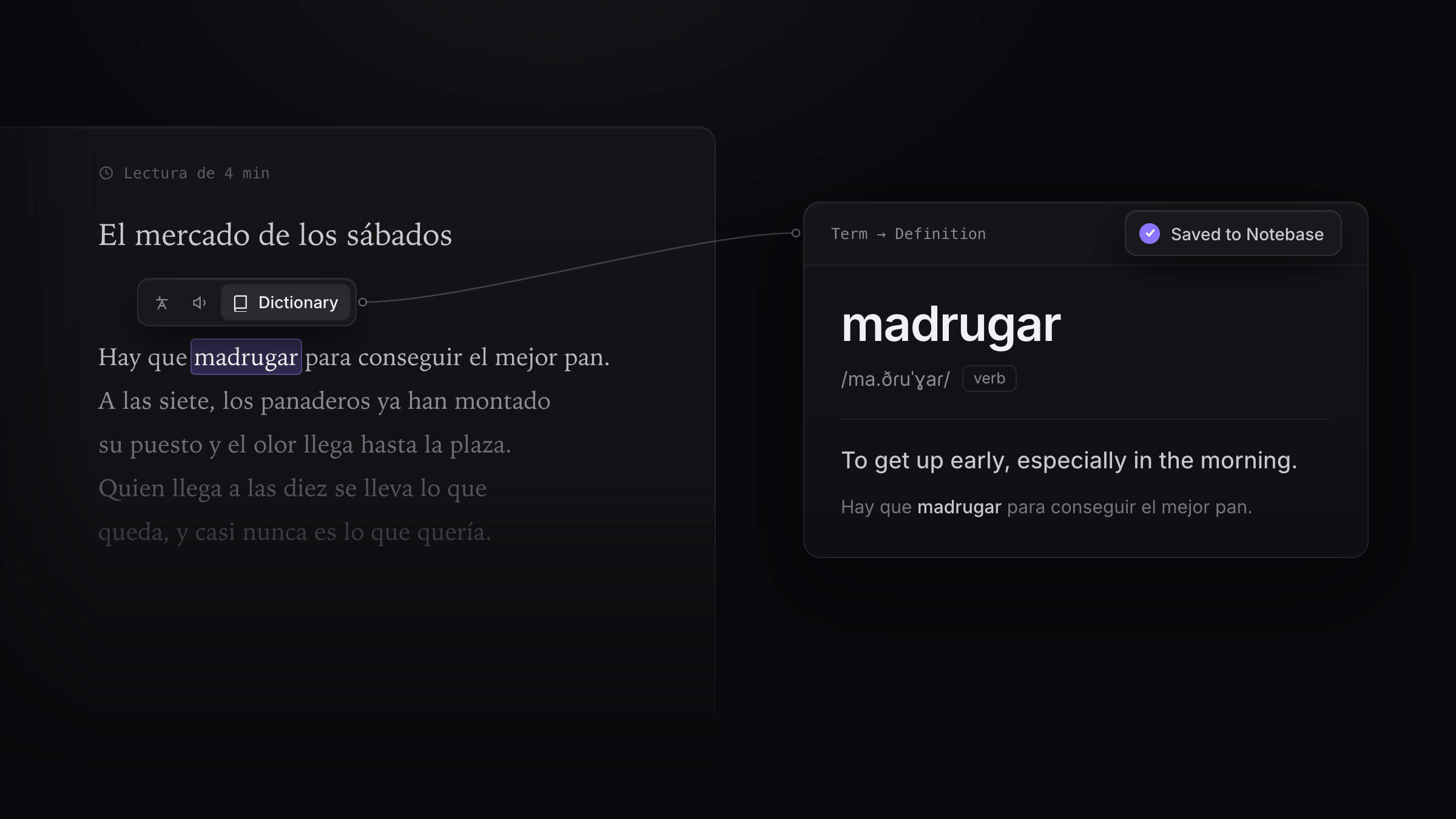
Anki is good at the reviewing. The slow part is making the cards: copy the word, look it up, paste a definition, go back for the sentence, fix the formatting, then do it all again for the next word. Twenty minutes later you have six cards and you have stopped reading.
So people ask two questions: is there a tool that makes the cards while I read, and is there an Anki alternative that uses AI to make them? There are several, and they take different parts of the work off your hands:
- Cards while you read. You meet a word on a web page or in subtitles, click it, and a card is made from it, together with the sentence it came from. Read Frog, Yomitan, Migaku, Readlang, AnkiMate and AnkiBeam work this way.
- Cards from a document. You hand over notes, a PDF or slides, and AI writes question-and-answer cards. RemNote and Knowt work this way, and so does AnkiMate.
- Where you review. Some tools write into Anki and need it open. Others have their own review, which makes them Anki alternatives.
The short answer: to make vocabulary cards as you read, without leaving the page, try Read Frog (free and open source; AI explains the word in its sentence, reviews use FSRS, and notes export to Anki as CSV) or Yomitan (free, dictionary-based, writes straight into Anki). If you learn mostly from shows and don't mind paying, look at Migaku. If you want to keep Anki and only automate the writing, look at AnkiMate or AnkiBeam. If you study subjects from notes and PDFs rather than a language, look at RemNote or Knowt.
We make Read Frog, so it comes first. Everything about the others comes from their own websites, help docs, store listings or GitHub, checked in November 2026. These tools change often, so check each one's site before you install.
At a glance
| Tool | How a card gets made | AI | Where you review | Anki | Free plan |
|---|---|---|---|---|---|
| Read Frog | Select a word, run Dictionary, click Save | ✓ | Read Frog, with FSRS | Export CSV; import a deck through AI | ✓ (10 notes) |
| Yomitan + AnkiConnect | Hover a word, press one key | No, uses dictionaries | Anki | Writes straight into Anki | ✓ |
| Migaku | Click a word in subtitles or on a page, then click again | ✓ | Migaku Memory or Anki | Anki add-on | No (10-day trial) |
| Readlang | Click a word or drag across a phrase | ✓ | Readlang | Export | ✓ (daily phrase limit) |
| AnkiMate | Select text, or use a whole page, PDF or YouTube video | ✓ | Anki | Writes into Anki | ✓ (3 generations a day) |
| AnkiBeam | Select a word, click the floating button, then Save | ✓ (your own key) | Anki | Writes into Anki | ✓ (you pay for the AI) |
| RemNote | Paste text, upload a PDF or slides, or clip from a page | ✓ | RemNote | Imports and exports .apkg | ✓ (limited AI) |
| Knowt | Upload notes, PDFs, slides, videos or lecture recordings | ✓ | Knowt | Import by pasting text; no Anki export | ✓ |
The details, and the browsers each one runs in, are in each tool's section below.
1. Read Frog
Read Frog is an open-source AI translation and language learning extension for Chrome, Edge and Firefox. Besides translating pages and subtitles, it turns the words you look up into notes, makes flashcards from those notes, and schedules your reviews in its web app.
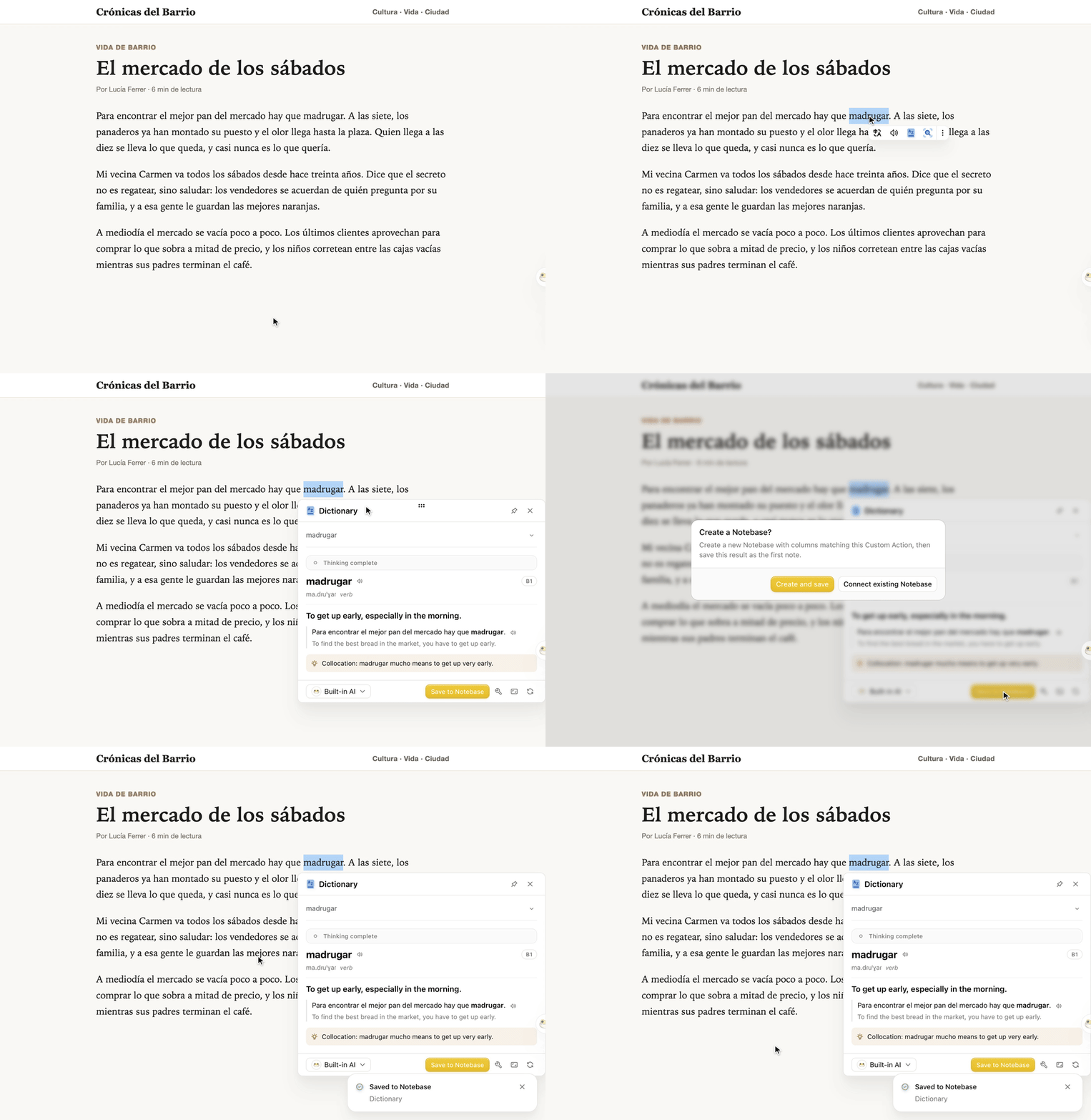
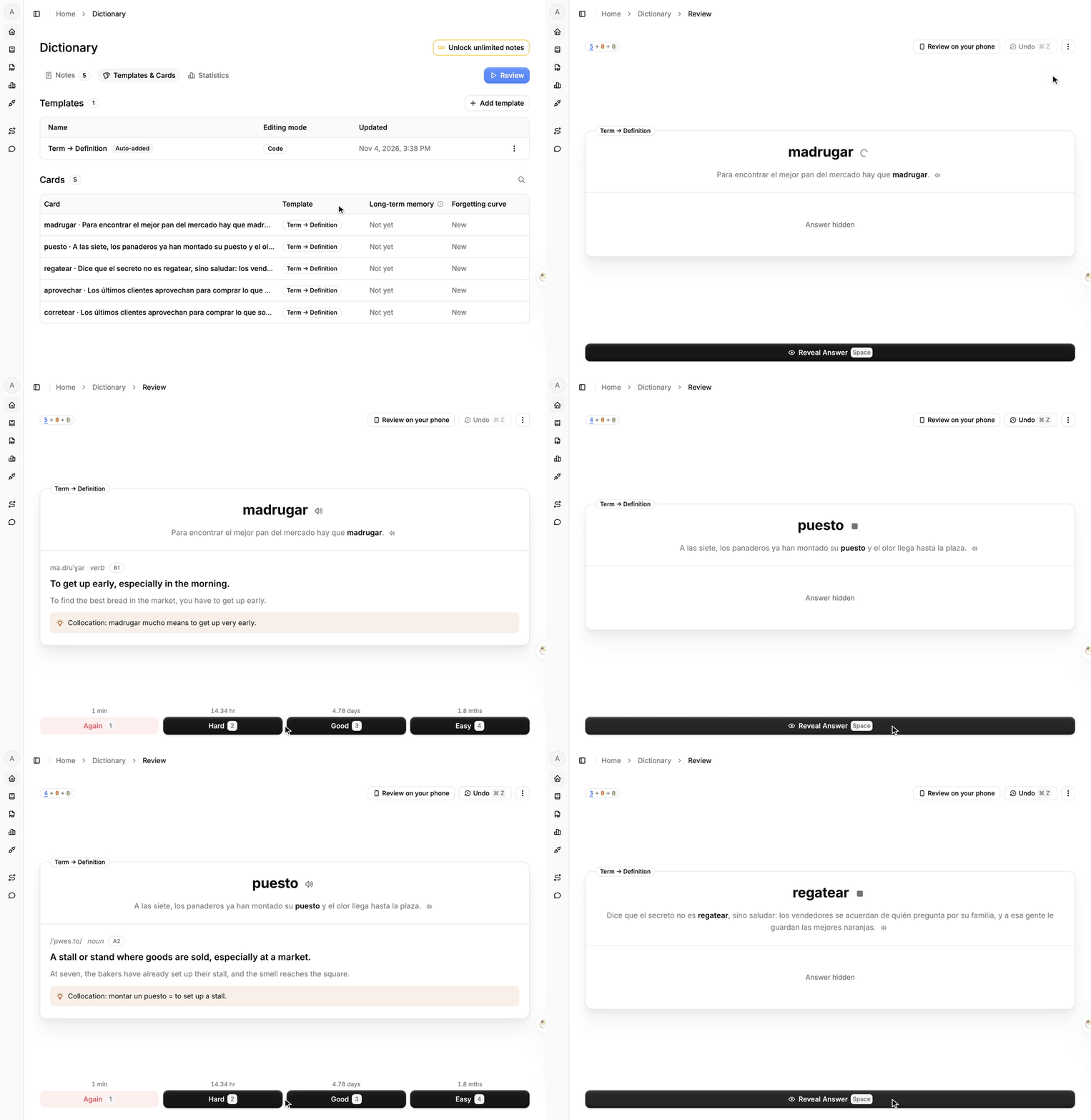
Here is the whole loop, recorded in the current version on a Spanish article.
Select a word and save it. Double-click a word, choose Dictionary in the toolbar that appears, and AI explains the word as it is used in that sentence: pronunciation, part of speech, the meaning here, a translation of the sentence and a memory tip. Click Save to Notebase. The first time, Read Frog asks Create a Notebase?; choose Create and save, and every later save goes straight in.
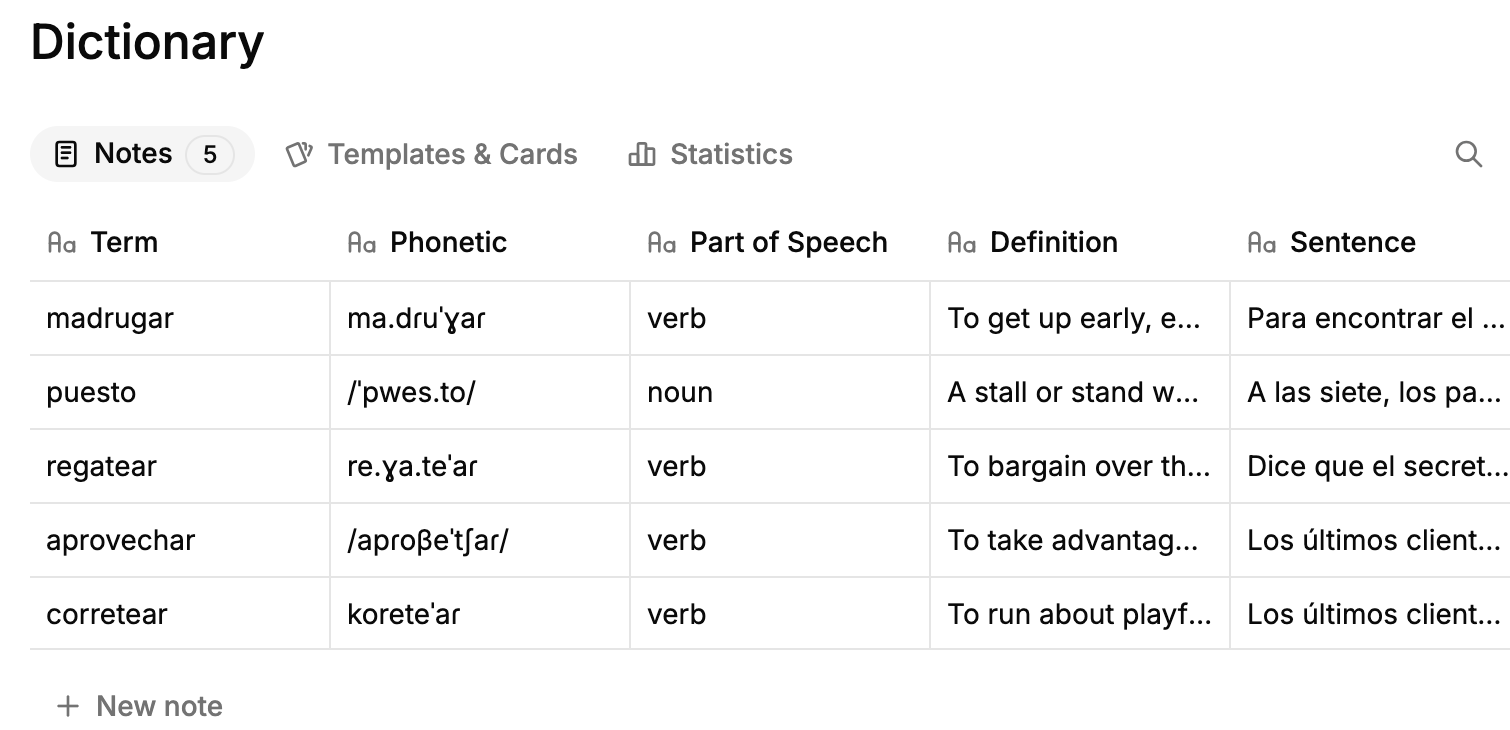
Each save becomes a note. A notebase is a table in your account. One save is one row, with the term, its pronunciation, part of speech, definition, the original sentence, its translation, a memory tip and a difficulty level each in its own field.
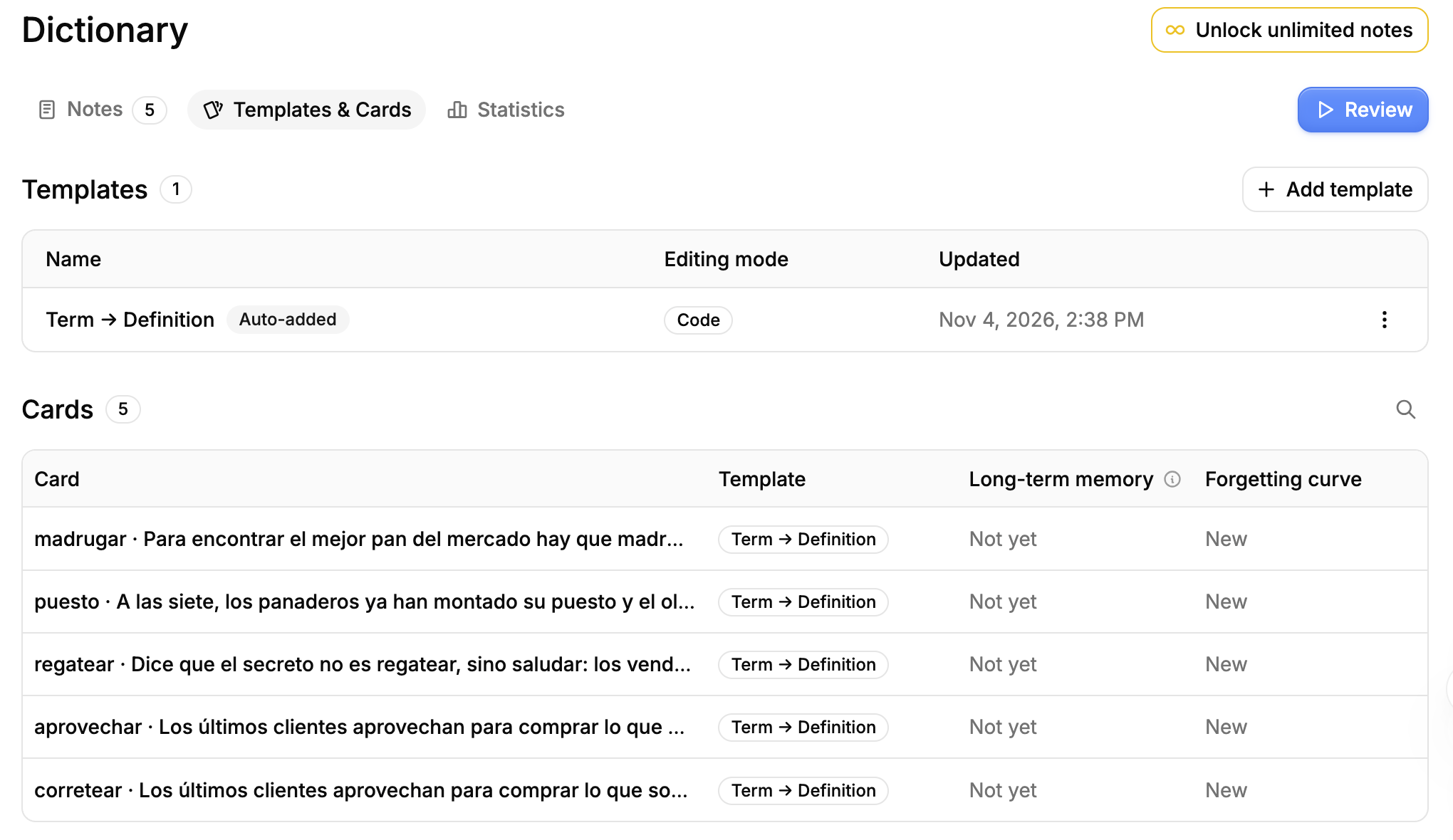
The cards make themselves. A card template decides what goes on the front and what goes on the back. A new notebase like this one gets a "Term → Definition" template added for you, marked Auto-added, so every note already has a card and you never write one by hand. Add more templates if you like, such as sentence → meaning; each note gets one card per template.
Review on a schedule. Press Review. Each card shows the word in its sentence. Recall the meaning, press Reveal Answer (or Space), then grade yourself Again, Hard, Good or Easy. Each button shows when the card will come back, and the FSRS algorithm sets the spacing. To carry on from your phone, the review page shows a QR code.
- Where it works: selected text on any web page, and words in the subtitles on YouTube, X and Netflix.
- AI: Dictionary runs on Read Frog's built-in AI, which a free account can use within a daily allowance, or on your own key for OpenAI, DeepSeek, Gemini or a local model through Ollama. You can change its prompt and fields, or write an action of your own, for example one that breaks down a whole sentence.
- Review: in the web app at readfrog.app, scheduled with FSRS. If an AI explanation is off, edit the note right from the review screen.
- Anki: export a notebase as CSV and import it into Anki. To bring an Anki deck the other way, give its text export to an AI assistant connected to Read Frog over MCP, and it writes the notes for you. Review history does not travel in either direction.
- Open source: yes, GPL-3.0.
- Price: translation is free. A free account holds 10 notes in total, enough to try the whole loop; Pro, at $3 a month, removes the limit.
- Browsers: Chrome, Edge, Firefox.
A good fit if you learn a language by reading real pages and want each card to come with its sentence and an explanation, with no Anki setup. How Learning Works maps the whole loop, and Import and Export (Anki, CSV) has the Anki steps.
2. Yomitan + AnkiConnect
Yomitan is a free, open-source pop-up dictionary extension, the successor to Yomichan. AnkiConnect is an Anki add-on that lets it write into Anki. Together they are the classic way to "mine" words into Anki, especially for Japanese.
- How a card gets made: hold Shift and hover over a word. The pop-up shows its dictionary entries with an add button, and one click or one key creates the Anki note.
- What goes on the card: whatever you map from your installed dictionaries: definitions, reading, furigana, audio, the sentence, a cloze, a screenshot, pitch accent, frequency and the page address. You need to install at least one dictionary first.
- AI: none. Definitions come from the dictionaries you install, so they do not explain what the word means in that particular sentence.
- Where it works: any page with selectable text. With asbplayer, a separate extension, it also works on subtitles in Netflix and YouTube.
- Review: in Anki, which has to be open with AnkiConnect installed.
- Languages: 34, with its richest features for Japanese.
- Open source: yes, GPL-3.0, as is AnkiConnect.
- Price: free.
- Browsers: Chrome, Edge, Firefox, and Firefox and Edge on Android.
A good fit if you already review in Anki and prefer dictionary entries to AI explanations.
3. Migaku
A paid language learning platform: a Chrome extension, iOS and Android apps, and Migaku Memory, a review app on the web.
- How a card gets made: click a word in subtitles or on a web page, and one more click builds a card with the word, native audio and the sentence. From a video it also adds a screenshot and the audio of that line.
- Where it works: Netflix, YouTube, Disney+, Viki and other video sites, any web page, and video files on your computer.
- AI: explanations of words and sentences in context.
- Review: in Migaku Memory, or in Anki through the Migaku Anki add-on.
- Languages: 11, including Japanese, Mandarin, Korean, Spanish and Cantonese.
- Open source: no.
- Price: no free plan. $10 a month or $96 a year, with a 10-day trial.
- Browsers: Chrome.
A good fit if you learn mostly from shows and videos and want audio and screenshots on your cards. See Read Frog vs Migaku for a full comparison.
4. Readlang
A reading app for language learners: a web reader plus Chrome and Firefox extensions.
- How a card gets made: click a word or drag across a phrase on any site, in a text you upload, or in a YouTube transcript. You see the translation, and a flashcard is created at the same moment, with the sentence as a cloze and its translation.
- AI: explanations of a word in its context.
- Review: spaced repetition in Readlang. Cards can be exported to Anki as cloze cards.
- Open source: no.
- Price: the free plan has unlimited single-word translations, but 10 phrase translations and 10 AI explanations a day. Premium is $6 a month or $48 a year; Premium Plus is $15 a month or $120 a year.
- Browsers: Chrome and Firefox extensions and a bookmarklet; on phones it runs as a web app.
A good fit if you want the card made the instant you click, with no extra step.
5. AnkiMate
A new extension that has AI write cards from what you are reading and sends them to Anki.
- How a card gets made: select text and right-click Generate flashcards, or use the side panel on a whole page, a PDF of up to 80 pages, or a YouTube transcript. Check and edit the batch, then send it to Anki.
- Templates: nine, including question and answer, reversed, cloze, language learning, and exam styles such as USMLE and GRE vocabulary.
- AI: the browser's built-in on-device model by default, or your own OpenAI, Anthropic or Google key.
- Review: in Anki, which has to be open with AnkiConnect installed.
- Open source: its site does not say.
- Price: free for 3 generations a day. Batch generation and cloze need Pro, a one-time purchase of $29.90 ($19.90 at launch).
- Browsers: Chrome, Edge. It is new, and its Chrome Web Store page showed only a handful of users when we checked.
A good fit if you study from PDFs and lectures and want AI to draft a whole batch of Anki cards at once.
6. AnkiBeam
An open-source extension for language learners that sends AI-filled vocabulary cards to Anki.
- How a card gets made: select a word on any page and click the floating button. AI fills in the meaning in this context, example sentences, pronunciation and etymology, and one click saves it to Anki.
- Templates: write your own prompts and map each output to an Anki field.
- AI: your own API key, such as Gemini, OpenAI or Claude.
- Review: in Anki, which has to be open with AnkiConnect installed.
- Open source: yes, MIT.
- Price: free; you pay your AI provider.
- Browsers: Chrome. Also new, with a handful of users when we checked.
A good fit if you want AI vocabulary cards in Anki, under your own key and your own prompt.
7. RemNote
A note-taking and flashcard app for studying any subject, on the web, desktop, iOS and Android, with a Chrome extension for clipping.
- How a card gets made: paste text (images too), upload a PDF or slides, highlight in its PDF reader, or select text on a web page with its Clipper and choose AI Generate Cards. You preview the cards and untick the ones you don't want before they are saved. Card types are question and answer, concept, and fill in the blank.
- Review: in RemNote. Its default scheduler is Anki's older SM-2 algorithm; FSRS is an optional beta.
- Anki: imports .apkg decks with their review history, and exports flashcards as .apkg.
- Language learning: no dedicated features.
- Open source: no.
- Price: the free plan includes 250 AI credits a month. Pro is $10 a month; Pro with AI is $20 a month.
- Browsers: works in any browser on the web; the Clipper is a Chrome extension.
A good fit if you are moving a whole Anki collection and study from lecture notes and PDFs.
8. Knowt
Bills itself as a free Quizlet alternative, on the web, iOS and Android, with a Chrome extension.
- How a card gets made: AI turns notes, PDFs, images, slides, videos, YouTube links, Google Drive files and lecture recordings into a flashcard set. The Chrome extension makes flashcards and summaries from web pages.
- Review: several study modes, including spaced repetition with Again, Hard, Good and Easy.
- Anki: you can bring cards in by pasting text; sets export only as PDF.
- Open source: no.
- Price: the free plan has unlimited sets and every study mode. Ultra is from $95.99 a year on its plans page.
- Browsers: works in any browser on the web; the extension is for Chrome.
A good fit if you are a student who wants a ready-made deck from class material, without Anki.
How to choose
- You learn a language by reading or watching real things: pick a tool that makes the card when you meet the word, with its sentence. Read Frog, Yomitan, Migaku, Readlang and AnkiBeam do this, and all except Yomitan explain the word with AI.
- You want to keep reviewing in Anki: Yomitan, AnkiMate and AnkiBeam write straight into Anki through AnkiConnect, and Migaku through its add-on. Read Frog and Readlang export to Anki, and RemNote exports .apkg.
- You want an Anki alternative with AI built in: Read Frog, Migaku, Readlang, RemNote and Knowt have their own review. Read Frog schedules with FSRS, the algorithm Anki also offers.
- You study subjects, not vocabulary: RemNote, Knowt and AnkiMate turn notes, PDFs and slides into question-and-answer cards.
- You care about open source: Read Frog, Yomitan and AnkiBeam have their code on GitHub.
FAQ
Is there a tool that makes Anki cards automatically while I read?
Yes. Yomitan with AnkiConnect adds a card from a dictionary entry with one key, and AnkiMate and AnkiBeam have AI write the card and send it to Anki. Read Frog and Readlang make the card in their own app as you look the word up, and both can export to Anki.
Is there an Anki alternative that uses AI to make flashcards?
For language learning, Read Frog, Migaku and Readlang make cards from the words you look up and review them in their own apps. For other subjects, RemNote and Knowt generate cards from notes and documents.
Can I move my Anki deck into Read Frog?
Yes, through an AI assistant. Export the deck from Anki as plain text, give the file to ChatGPT, Claude or another assistant connected to Read Frog over MCP, and ask it to import the notes. Review history and media stay behind. The free plan holds 10 notes, so a whole deck needs Pro.
Does Read Frog schedule reviews like Anki?
Read Frog uses FSRS, the scheduling algorithm Anki has offered as an option since version 23.10. You grade each card Again, Hard, Good or Easy, as in Anki.
Do AI-made cards need checking?
Yes. AI can get an explanation wrong, most often a word's origin or a memory tip. Glance at each card the first time it comes up; in Read Frog you can fix the note from the review screen without leaving the session.