The best clip in your feed. In a language you don't speak.
A founder's demo, a conference highlight, a news clip from the other side of the world: X is full of video worth watching. Plenty of those clips come with captions, but only in the language the poster speaks.
Read Frog has translated YouTube subtitles for a while. On X, you were stuck with the original captions.
Not anymore. Starting with 1.49.0, the Read Frog translate button shows up on X videos too. Click it, and the video's captions become bilingual subtitles in your language.
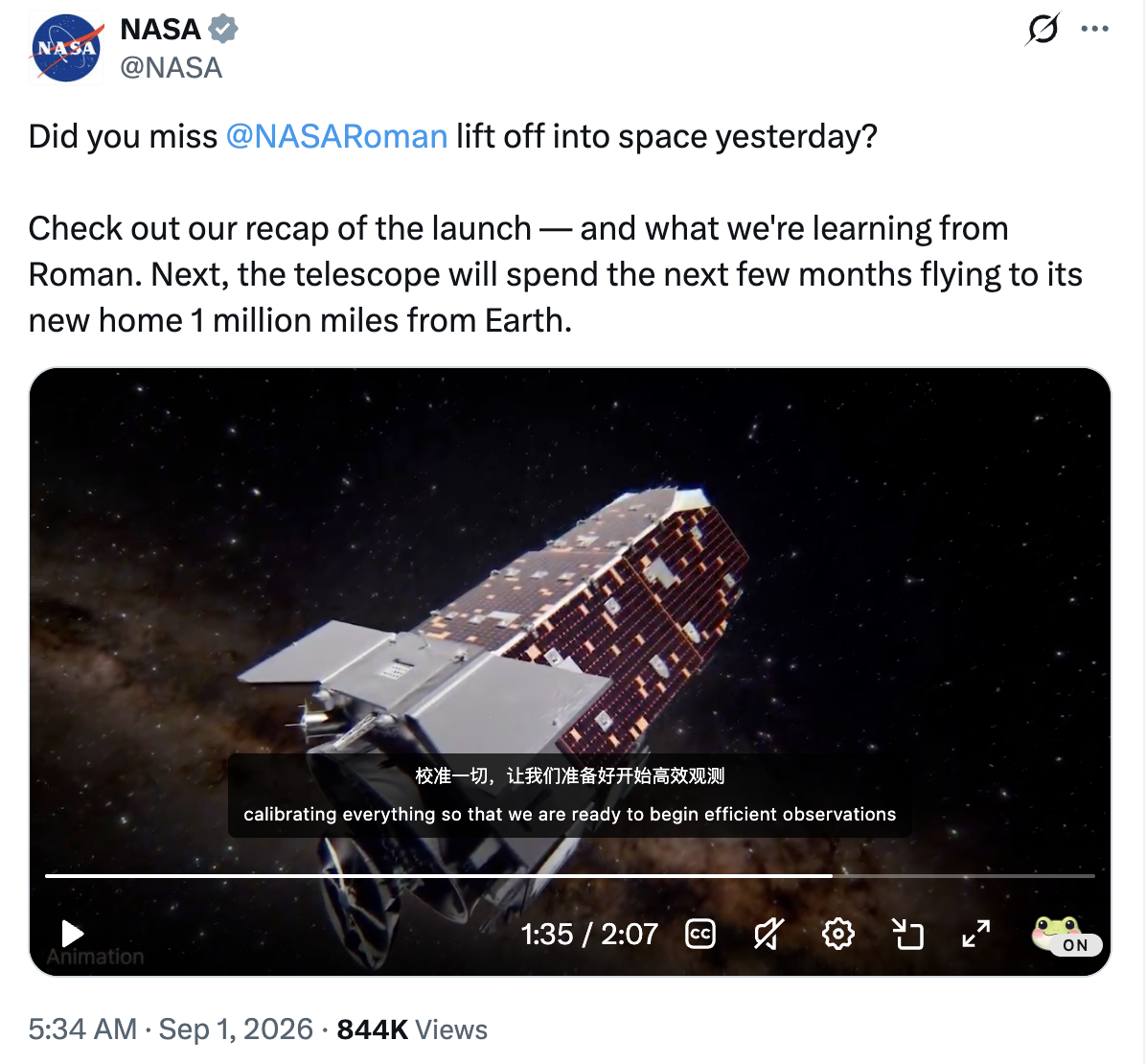
This was one of the most-voted requests in our feedback centre: 46 of you asked for X video translation. Thank you for pushing it up the list 🐸
What's new
| On X... | Before | With 1.49.0 |
|---|---|---|
| A video in a single post | Original captions only | Bilingual subtitles, one click away |
| A video in the replies | Original captions only | Translated too, independently of the main post |
| A video in your timeline | Scroll past or open it | Translate it right there, no need to open the post |
| X's own captions | Always there | Hidden while Read Frog's are on, restored when you stop |
It's the same subtitle overlay you know from YouTube: bilingual, original-only, or translation-only display, drag it anywhere on the player, and keep your own font, size, color, and background settings. Nothing new to learn.

How to use it
- Find a video on X. It can be on a post page, in the replies below it, or in your home timeline.
- Hover over the video. X's controls bar appears, and the Read Frog button appears inside it.
- Click the Read Frog button and switch on "Read Frog Video Subtitles". Subtitles in your language appear on the player within a moment, and the button flips from OFF to ON.
- Want to translate a different video? Hover it and click again. The button follows whichever video you're pointing at.
| Before: X's own captions | After: Read Frog bilingual subtitles |
|---|---|
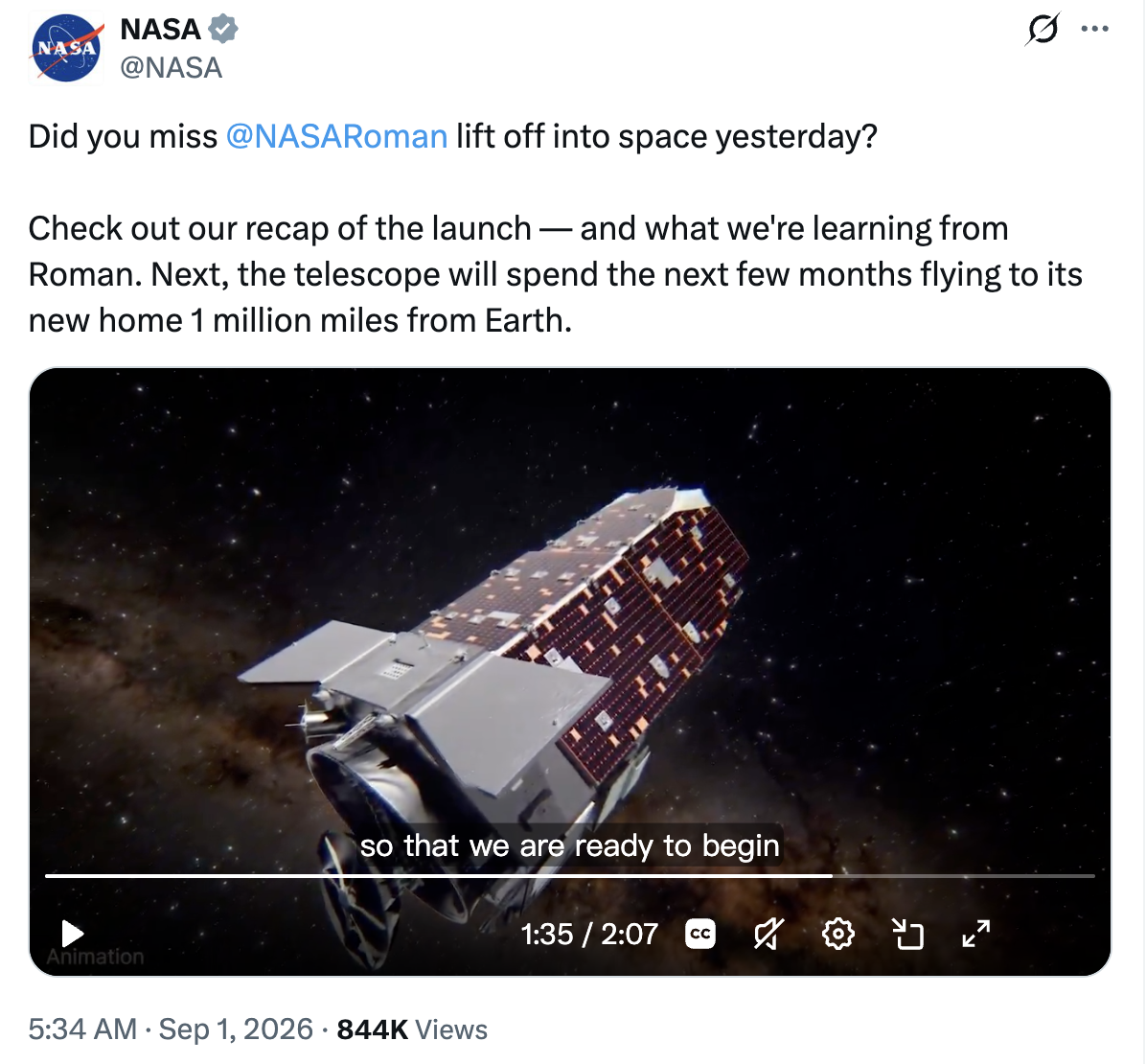 | |
Drag the subtitles down to the bottom of the video if you like. While X's controls are showing, Read Frog keeps them just above the bar so they never overlap. Once the controls fade out, the subtitles settle back at the edge.
Little things that make it feel right
X is a busy page, often with a dozen videos on screen at once. We spent a lot of time making sure everything behaves the way you'd expect:
- One video at a time. Translate video A, then switch to video B, and A's subtitles clear so B gets its own. You won't see one clip's subtitles on another.
- Replies are their own videos. Translate a clip in the replies and you get that clip's captions, not the main post's.
- No double subtitles. While Read Frog's subtitles are on, X's native captions stay hidden, even if you press X's CC button afterwards. Turn ours off and your original caption setting comes back.
- Works after navigating. Jump between posts inside X and the subtitles still position and drag correctly.
Where it shines
| Scenario | Why it helps |
|---|---|
| 🎤 Talks and interviews shared as clips | Follow the argument without pausing to reach for a translator |
| 📰 Breaking news from abroad | Understand the footage the moment it hits your timeline |
| 🛠️ Product demos and launch videos | Catch every feature a founder walks through |
| 🗣️ Language learning | Hear the original, read both lines, and pick up how people really talk |
Being upfront about the limits
The video needs captions. Read Frog translates the captions that come with an X video. If a video has none, the button is still there, but you'll see a "no subtitles" message instead of a translation. AI transcription for caption-less videos is still YouTube only for now.
What's next
Getting X working meant building a new way for Read Frog to read captions straight from a video player. The nice side effect: other sites whose players carry their own captions are now much easier for us to support. Online course platforms and other video sites are on our list.
Is there a site you watch a lot of video on? Tell us in the feedback centre. Votes really do decide what comes next, as this feature shows.
Try it now
- Update Read Frog to 1.49.0. Your browser usually does this on its own within a few days.
- Make sure video subtitles are on in Options → Video Subtitles.
- Open X, hover a video with captions, and click the Read Frog button.
Something not working as described? Find us on Discord. We read everything.
Written by
taiiiyang
At
Sun Sep 27 2026
Extension Version
1.49.0