
Translation Control
What starts translating on its own, what never does, and which paragraphs get skipped once it has started.
Open Options → Translation → Translation control → Manage controls.
Six rows live here, and together they answer one question: without you pressing anything, what does Read Frog translate?
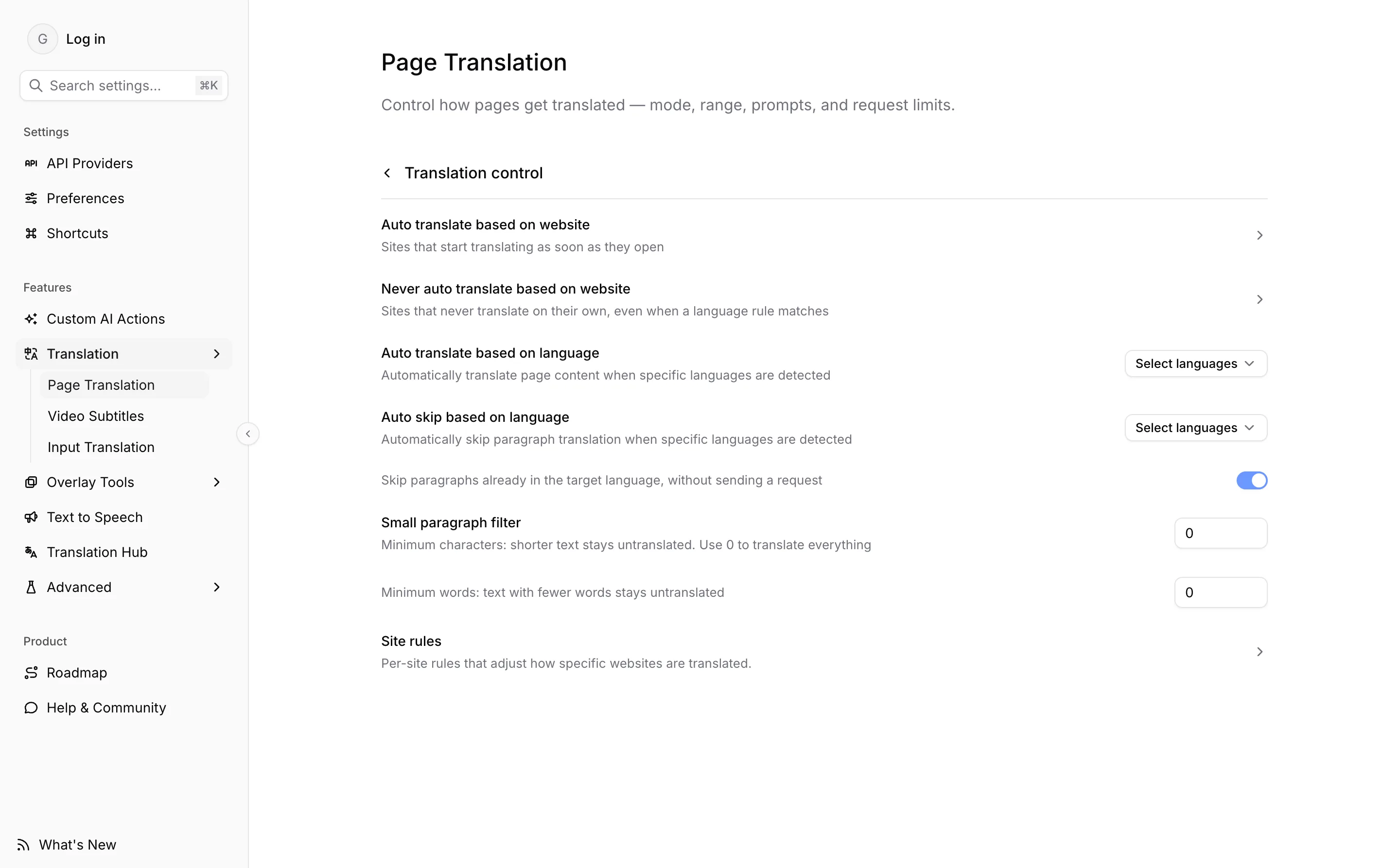
None of this decides whether Read Frog may run on a site at all. That is Site Control, under Options → Preferences → Extension activation. A site excluded there has no Read Frog on it to start anything, and adding it here changes nothing.
Starting by website
Two lists, both taking URL patterns.
| List | What it does |
|---|---|
| Auto translate based on website | These sites start translating as soon as they open |
| Never auto translate based on website | These sites never translate on their own, even when a language rule matches |
The never-list is checked first and wins outright. If a page matches both, or matches the never-list while its language is also on your auto-translate language list, nothing starts. It is the way to carve one site out of a rule you otherwise want.
Both lists use the same URL patterns as the rest of Read Frog, so example.com means that exact host, and *.example.com covers the subdomains and the apex together. A fresh install ships *.news.ycombinator.com in the auto-translate list as an example you can delete.
When you use the popup's per-site toggle instead of typing a pattern, Read Frog stores *.host for you — you pointed at a site, not at one hostname.
Starting by language
Auto translate based on language starts translation when the page's detected language is one you listed. This is the rule for "translate Japanese pages, wherever they are", as opposed to naming the sites.
It depends on detection actually producing an answer: a page whose language cannot be determined matches no language rule, and one detected as something you did not list is left alone. Detection itself — local or on an LLM — is configured under Options → API Providers → Language detection.
Skipping paragraphs
The two rows above start a translation. The next three decide which paragraphs it leaves out once it is running.
Auto skip based on language takes a list of languages. A paragraph detected as one of them is skipped rather than sent — useful on a page that is already part in a language you read.
Under it is a separate switch for the target language: skip paragraphs already in the target language, without sending a request. It is on by default, and it is what stops a bilingual page from having its translated half translated again.
Both run a local detector on each paragraph, never a model request, and both decline to guess on short text: skipping by the target language needs at least 50 characters, skipping by your listed languages at least 10. Anything shorter is translated rather than risk a wrong skip.
Small paragraph filter is two thresholds, a minimum character count and a minimum word count. Text below either one stays untranslated. Both default to 0, which means nothing is filtered by length until you set it. A matching site rule can override the thresholds for one website.
The thresholds are the first place to look when one short line on a page refuses to translate, and the filters apply to hover translation too — pointing at a paragraph does not exempt it.
Per-site DOM behaviour
The last row leads to Site Rules, which is a different kind of control again: not whether to translate a page, but how to walk it — which elements to treat as content, which to leave alone, and which thresholds to override. Built-in rules ship with the extension and you can add your own.
Which control to reach for
| You want | Use |
|---|---|
| Read Frog absent from a site entirely | Site Control |
| A site translated the moment it opens | Auto translate based on website |
| One site exempt from your automatic rules | Never auto translate based on website |
| Every page in a given language translated | Auto translate based on language |
| Half of a bilingual page left as it is | Auto skip based on language |
| Menus and labels left untranslated | Small paragraph filter, or Translation range set to main content |
| One site's layout handled differently | Site Rules |