
カスタム AI アクション
選択したテキストに対して自分の AI アクションを実行し、結果に何を書くか、どう見せるか、クリックで何が起きるかを決められます。
概要
カスタム AI アクションは、プロンプトを何度でも実行できる小さなツールに変えます。どのページでも、テキストを選んで選択ツールバーのアクションをクリックすると、Read Frog は毎回同じ設定でそのテキストを AI に送ります。答えはカードになって返ってきます。
各アクションには次のものがあります。
- プロンプト:AI に何を頼むか
- 出力フィールド:答えに何が含まれるか
- レイアウト:カードの見た目と、クリックしたときに何が起きるか
- プロバイダー:アクションを実行する AI モデル
チャットと違い、答えには毎回同じフィールドが同じ位置に並びます。そのため、単語を調べる、長い文を分解する、自分の文章を見直す、要約するといった、読みながら何度も繰り返す作業に向いています。
アクションはデフォルトで 組み込み AI を使うので、何も設定する必要はありません。アカウントがなくても少なめの 1 日分のクォータがあり、ログインすると増えます(アカウントとプランを参照)。代わりに自分のモデルを使う場合は、構造化出力に対応した LLM プロバイダーを選んでください。対応しているかどうかわからない場合は、AI SDK Model Capabilities かモデルプロバイダーの公式ドキュメントを確認してください。
組み込みアクション
Read Frog には、次の 3 つのアクションが用意されています。
| アクション | できること | 場所 |
|---|---|---|
| 辞書 | 単語や短いフレーズを、それが出てきた文に合わせて調べます。 | 選択ツールバー |
| 構文解析 | 長い文に先生のように書き込みを入れ、文の核、すべての節、難しくしている箇所を示します。 | 選択ツールバー |
| 文章添削 | 自分の文章の誤りやぎこちない言い回しに印を付け、直した文を返します。 | 固定するまでは その他の操作 メニュー |
組み込みアクションは編集できませんが、オフにしたり、プロバイダーを選んだり、Notebase につないだりはできます。それ以外を変えたいときは、カスタム AI アクション でそのアクションを開き、名前の横にある カスタマイズ をクリックします。Read Frog が編集できるコピーを作り、元のアクションはそのまま残ります。
構文解析
学んでいる言語の文を選択して、構文解析 をクリックします。文が書き込み付きで返ってきて、その下に訳文が表示されます。
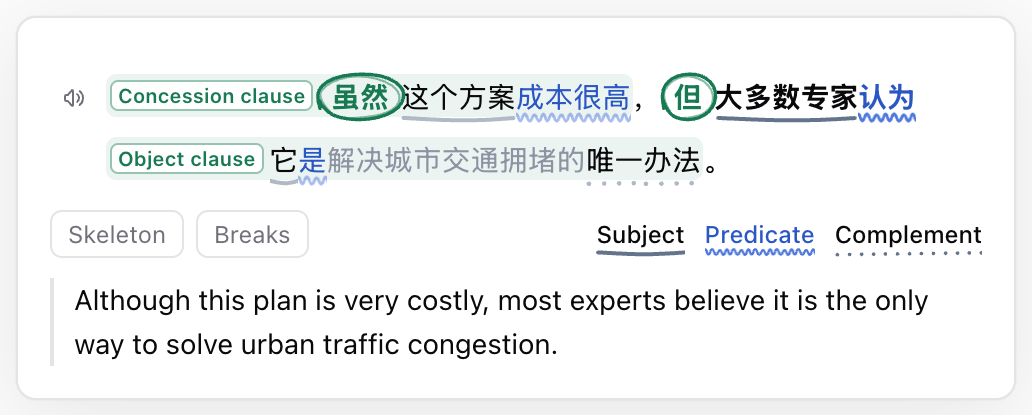
| 見えるもの | 意味 |
|---|---|
| 太字 の語 | 主節の核です。ほかの部分はすべて、詳しい情報を付け足しています。 |
| 青い語と波線 | 述語動詞です。has been meeting のような、動詞のまとまり全体を指します。 |
| 語の下のそのほかの線 | 句の役割(主語、目的語、補語、副詞的修飾)です。どの線が何を表すかは、文の下の凡例でわかります。 |
| ラベル付きの薄い色の枠 | 節です。ラベルは、関係詞節、目的語節、条件の副詞節など、その節の働きを示します。 |
| 丸で囲まれた語 | 節を導く語です。which、that、if などがあります。 |
| 小さなラベル付きの赤い星 | 読み手がつまずきやすい箇所です。受動態、倒置、省略などがあります。 |
どこかの部分にマウスを合わせるかタップすると、それが何で、どの語にかかっているかが表示されます。見ているあいだ、文のほかの部分は薄くなります。スピーカーボタンを押すと、文が読み上げられます。
2 つのスイッチで、同じ文をさらに 2 通りに見られます。
| スイッチ | 見えるもの |
|---|---|
| 骨組みだけ | 節はそれぞれラベルに、修飾語はすべて「…」にたたまれ、骨組みだけが残ります。 |
| スラッシュ | 先生が鉛筆で書き込むような区切りのスラッシュが入り、文をひとかたまりずつ読めます。 |
辞書
単語か短いフレーズを選択して、辞書 をクリックします。
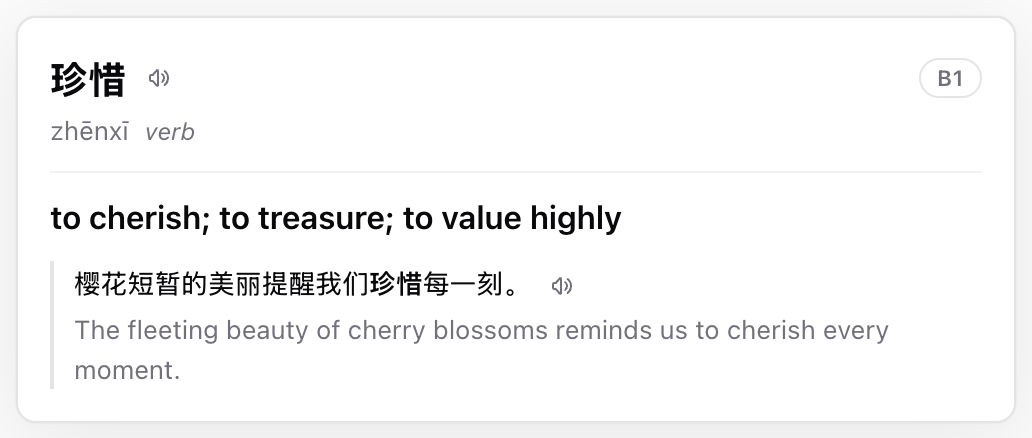
カードには、基本形に直した語が、発音、品詞、CEFR レベルとともに表示されます。続いて、そのページでの使われ方に合う意味が 1 つだけ示されます。その下には、語が出てきた文(語は太字)とその訳が並びます。スピーカーボタンを押すと、語と文が読み上げられます。
出力フィールドは 見出し語、発音、品詞、例文、例文中の語形、意味、例文の翻訳、難易度 です。例文中の語形 は、どの語を太字にするかをカードに伝えます。
文全体ではなく、単語か短いフレーズを選択してください。文全体には構文解析を使います。
自分のアクションを作る
- Read Frog 設定を開きます。
- カスタム AI アクション に移動します。
- AI アクションを追加 をクリックします。
- テンプレートを 辞書、構文解析、文章添削、Blank から選びます。
- 設定 タブで各項目を入力します。編集した内容はその場で保存されます。
- アクションは有効のままにしておきます。新しいアクションには、選択ツールバーに専用のボタンができます。
設定 タブには、次の項目がこの順に並んでいます。
- 名前:アクションの名前。ボタンにマウスを合わせると表示されます
- アイコン:
tabler:bulbのようなアイコン名。icon-sets.iconify.design でアイコンを検索して、名前をコピーできます - プロバイダー:組み込み AI、または構造化出力に対応した自分の LLM プロバイダー
- システムプロンプト:役割、目標、ルール、例
- プロンプト:入力。ふつうは下のプロンプトトークンを書くだけです
- 出力スキーマ:答えに含まれるフィールド
- レイアウト:カードの見た目と、クリックしたときの動き
Notebase タブを使うと、結果を Notebase に保存できます(結果を Notebase に保存を参照)。
AI に設定を手伝ってもらう
何を書けばいいかわからないときは、いつも使っている AI チャットに設定を埋めてもらえます。
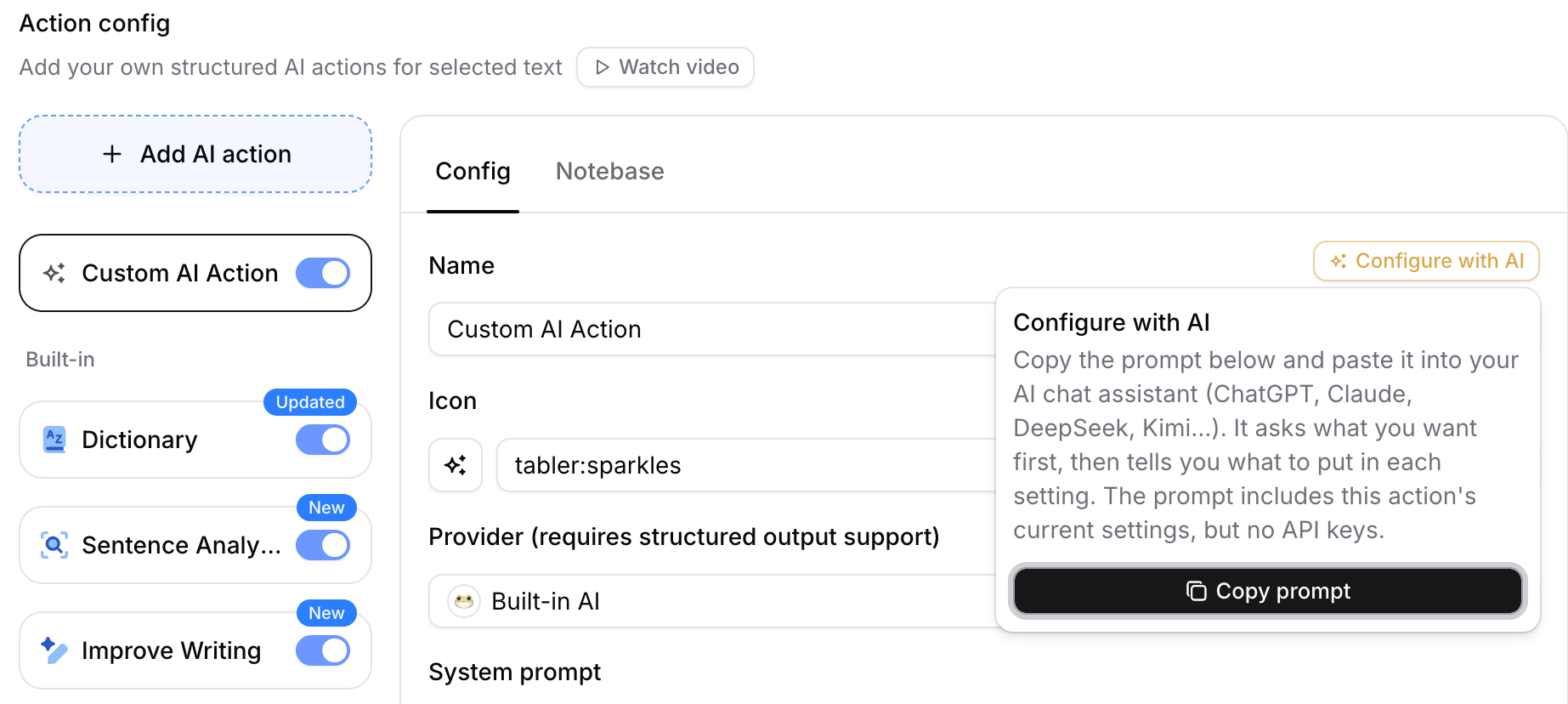
- 自分で作ったアクションを開き、名前の横にある AI に設定を手伝ってもらう をクリックしてから、プロンプトをコピー をクリックします。
- プロンプトを ChatGPT、Claude、DeepSeek、Kimi など、好きな AI チャットに貼り付けます。
- 「成語カード:ピンイン、字義、意味、由来」のように、作りたいものを伝えます。AI は必要なことを質問してから、そのまま貼り付けられる形で各設定を返してくれます。
- 返ってきた設定をそれぞれエディターに貼り付け、レイアウトのプレビューでカードを確かめます。
プロンプトにはそのアクションの現在の設定が含まれるので、「漢字のタイル風にして」「クリックするまで意味を隠して」のように、作成済みのアクションの手直しも頼めます。API キーが含まれることはありません。
プロンプトトークン
システムプロンプト、プロンプト、各フィールドの説明では、次のトークンを使えます。Read Frog はリクエストを送る前に、これらをプレーンテキストに置き換えます。
| トークン | 置き換わる内容 |
|---|---|
{{selection}} | 選択したテキスト |
{{paragraphs}} | 選択範囲を含む段落を空行でつなげたもの(最大 2000 文字) |
{{targetLanguage}} | 設定しているターゲット言語 |
{{webTitle}} | ページのタイトル |
{{webUrl}} | ページの完全な URL |
{{webContent}} | ページの本文(最大 2000 文字) |
出力スキーマの仕組み
出力スキーマには、AI が埋めるフィールドを並べます。各フィールドには次の項目があります。
- フィールド名:素のフィールド一覧で値の上に表示されるラベルも兼ねるので、自分が読む言語で付けます
- フィールド型:テキスト または 数値
- 説明:フィールドに何を入れるか、どの言語で書くか
出力スキーマには 2 つの役割があります。
- どのフィールドを返さなければならないかをモデルに伝えます。
- 表示する値をレイアウトに渡します。
フィールドの説明は、人が読むためだけのメモではありません。モデルがそのフィールドを埋めるときの、いちばんの手がかりです。言語、長さ、形式などのルールはここで指定します。
知っておきたい点がいくつかあります。
- 答えのストリーミング中、フィールドは上から順に届きます。最初に読みたいものをいちばん上に置きましょう。
- フィールドが少ないほど、答えは速く、安定します。8 個以内を目安にしてください。
- リスト型はありません。リストにしたいときは、説明で JSON 配列を求める テキスト フィールドを使い、レイアウトでリストとして表示します。
- フィールド名を変えると、レイアウト内でそのフィールドを参照している箇所も更新されます。
- フィールドを読み上げたいときは、レイアウトに読み上げボタンを追加します。これが以前の 読み上げを有効にする オプションに代わるものです。
レイアウト
レイアウトは、カードの見た目と、クリックしたときに何が起きるかを決めます。レイアウトが空のときは素のフィールド一覧が表示され、各フィールドの名前の下に値が並びます。
レイアウト で 編集 をクリックすると、レイアウトエディターが開きます。
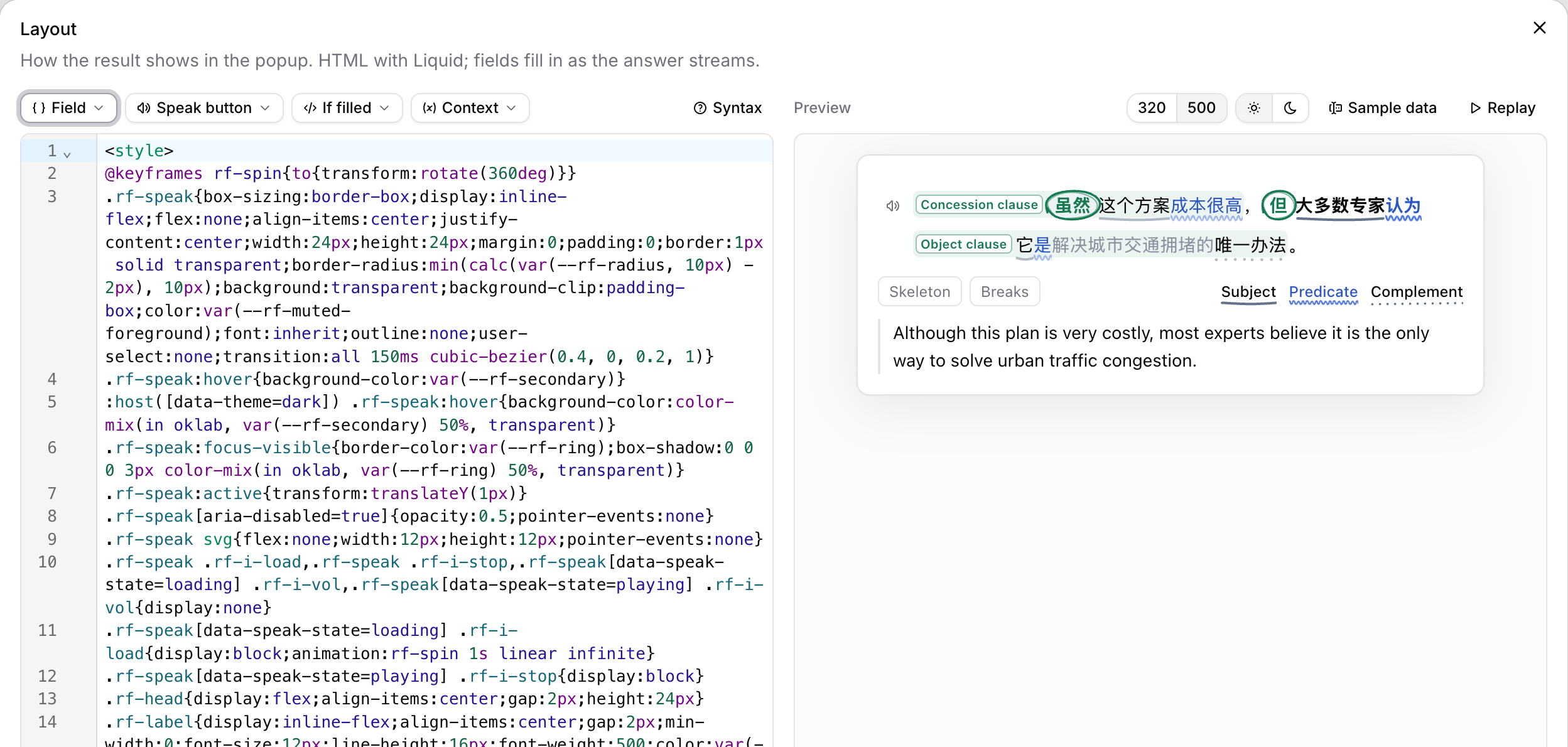
- 左側はレイアウトのソースです。フィールド、読み上げボタン、値があるとき、コンテキスト を押すと、用意された部品がカーソル位置に入ります。構文 を開くと、何が書けるかの説明が表示されます。
- 右側はライブプレビューです。幅は 320 と 500 ピクセル(ポップアップの最小幅と既定の幅)、テーマはライトとダークの両方で確認しましょう。サンプルデータ で表示する値を変えられ、再生 を押すと答えがストリーミングで届く様子を再現できます。
- デフォルトに戻す を使うと、レイアウトを素のフィールド一覧か、フィールドが合えば組み込みのカードに置き換えられます。
組み込みアクションのレイアウトは読み取り専用です。編集するには カスタマイズ をクリックしてコピーを作ります。
レイアウトの書き方
レイアウトは、Liquid のタグを使った HTML です。答えのストリーミングに合わせて更新されるので、各フィールドは届いた時点で埋まります。
| 書き方 | できること |
|---|---|
{{ ["Field name"] }} | フィールドを表示します。シンプルな英語の名前なら、{{ Word }} のように括弧と引用符を省いても書けます。 |
{% if ["Field name"] %}…{% endif %} | フィールドに値が入ったときだけ中身を表示します。 |
{{ ctx.selection }} | 選択したテキストを表示します。 |
newline_to_br、lines、parse_json | それぞれ、改行を保つ、テキストを行ごとに分ける、JSON のリストを読み込むために使います。 |
フィルターは {{ ["Notes"] | newline_to_br }} のように、パイプの後ろに書きます。CSS は <style> ブロックに書きます。適用されるのはカードの中だけです。var(--rf-muted-foreground) などの色は、ライトとダークのテーマに合わせて切り替わります。
次の属性を使うと、JavaScript なしでカードをインタラクティブにできます。
| 属性・要素 | 動作 |
|---|---|
data-speak="text" | クリックすると、そのテキストを読み上げます。 |
data-tip="text" | マウスを合わせるかタップすると、そのテキストを吹き出しで表示します。 |
data-toggle="name" | クリックするたびに name のオンとオフが切り替わります。スタイルは :host([data-toggles~=name]) で指定します。 |
data-copy="text" | クリックすると、そのテキストをコピーします。 |
<details> と <summary> | クリックでセクションが開閉します。 |
たとえば次のカードは、成語を読み上げ、クリックするまで意味を隠しておきます(Idiom と Meaning の 2 つの テキスト フィールドを使います)。
<style>
  .idiom { font-size: 18px; font-weight: 600; }
  button {
    border: 1px solid var(--rf-border); border-radius: 6px;
    background: none; color: inherit; font: inherit; cursor: pointer;
  }
  .meaning { display: none; }
  :host([data-toggles~=meaning]) .meaning { display: block; }
</style>
{% if Idiom %}
<p class="idiom">
  {{ Idiom }}
  <button type="button" data-speak="{{ Idiom }}" aria-label="読み上げ">🔊</button>
</p>
{% endif %}
{% if Meaning %}
<button type="button" data-toggle="meaning">意味を表示</button>
<p class="meaning">{{ Meaning }}</p>
{% endif %}
レイアウトではスクリプトを実行できず、Web から何かを読み込むこともできません。<script>、フォーム、iframe は使えず、@import や @font-face も使えません。画像は data: URI にする必要があります。レイアウトにエラーがあったり制限を超えたりすると、カードは素のフィールド一覧に戻り、その理由がレイアウトエディターに表示されます。
「その他の操作」メニュー
選択ツールバーの最後には その他の操作 メニューがあり、持っているアクションがすべて並んでいます。
- メニューのアクションをクリックすると、そのアクションが実行されます。
- よく使うものには ツールバーに固定 を、メニューに戻したいものには ツールバーから固定解除 を選びます。
- アクションをドラッグして、好きな順に並べ替えられます。
- 新しく作るときは、いちばん下の カスタム AI アクションを追加 を選びます。
結果を Notebase に保存
どのアクションも、結果を Notebase に保存できます。たとえば、辞書で調べた語を自分の単語帳にできます。
いちばん手早いのは、アクションを実行して結果の Notebase に保存 をクリックし、作成して保存 を選ぶ方法です。Read Frog がアクションの名前で Notebase を作り、出力フィールドごとにフィールドを 1 つずつ用意して、結果を最初のノートとして保存します。それ以降、そのアクションからの保存は同じ Notebase に入ります。readfrog.app にログインしていない場合は、ボタンが先にログインを促します。
すでにある Notebase に保存するには、アクションの Notebase タブを開いて Notebase を選び、アクションのフィールドを Notebase のフィールドに対応づけます。
詳しい設定方法は拡張機能から保存するをご覧ください。保存したものをフラッシュカードで復習するには、Notebase にカードテンプレートを追加します。
作ってみる:読書要約アクション
初めてカスタムアクションを作るなら、Blank から始めて、読書要約ツールを作ってみましょう。
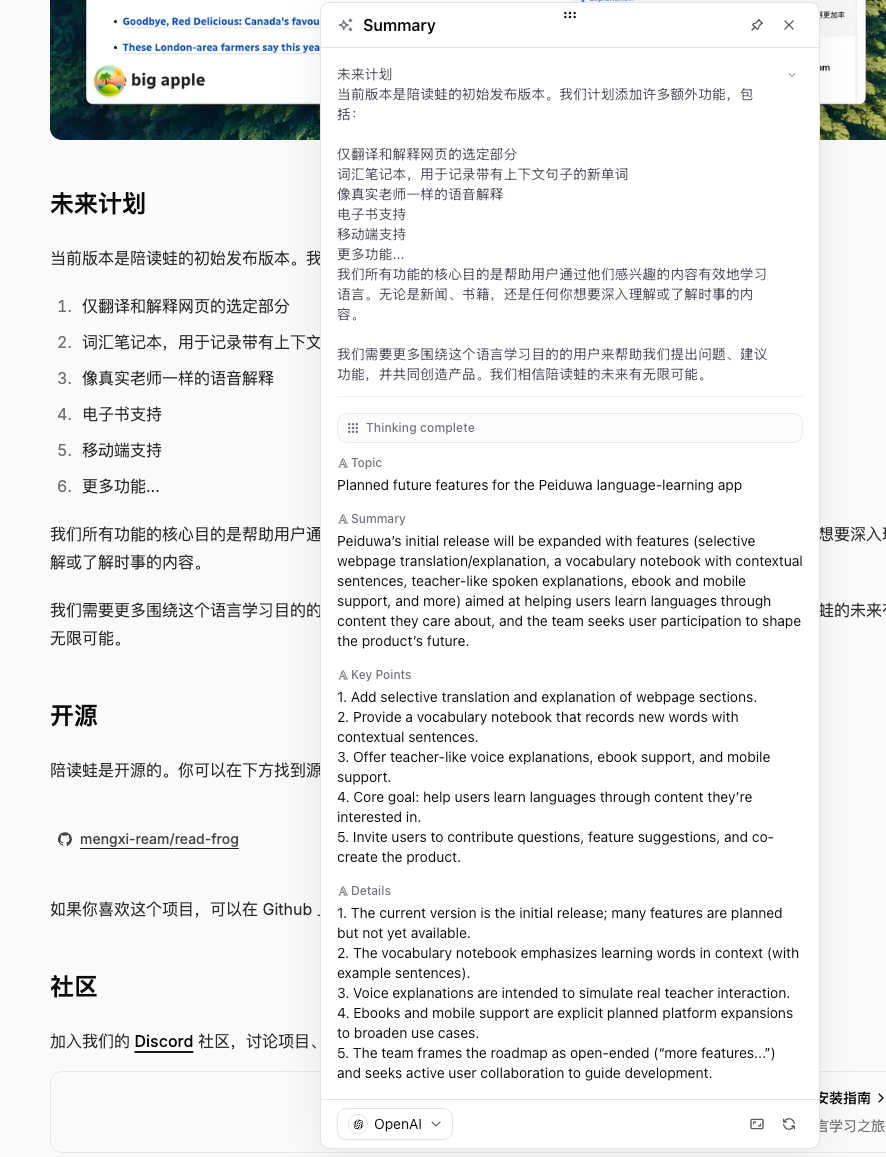
システムプロンプト
You are a summary assistant for learners and researchers.

## Goal

Read the given article content and produce a clear and accurate summary that matches the required output object.

## Rules
1. Only use information from the given content. Do not add new facts.
2. Focus on the main topic, the core summary, the key points, and important details.
3. Stay faithful to the original meaning.
4. Use clear and simple language that is good for reading and review.
5. Do not rewrite the full text line by line. Extract information instead.
6. Keep important technical or academic terms when needed.
7. Important details should help the reader understand the text better.
8. If a field cannot be determined from the text, return an empty string.
9. Use {{targetLanguage}} for every field except original source content.
10. Keep the output tightly related to the input text.

## Examples

### Example 1

Input:
Selection: hybrid models
Paragraphs: Remote work has changed how companies operate. It gives employees more flexibility, reduces commuting time, and can improve work-life balance. However, it also creates challenges in communication, team cohesion, and performance management. Many companies are now trying hybrid models to balance flexibility and collaboration.
Target language: English

Output:
- Topic: The impact of remote work on companies and employees
- Summary: The text explains that remote work brings flexibility and efficiency benefits, but it also creates problems in communication, team cohesion, and performance management, so many companies now use hybrid work as a practical balance.
- Key Points:
1. Remote work gives employees more flexibility.\r\n
2. Remote work reduces commuting time.\r\n
3. Remote work can improve work-life balance.\r\n
4. Remote work can cause communication and teamwork problems.\r\n
5. Hybrid work is a common way to balance flexibility and collaboration.\r\n
- Details:
1. The text covers both employee benefits and management challenges.\r\n
2. The main problems are communication, team cohesion, and performance management.\r\n
3. Hybrid work is presented as a practical solution, not just a theory.\r\n

### Example 2

Input:
Selection: 誤分類が依然として多かった
Paragraphs: この論文では、画像認識における小規模データ問題を解決するために、事前学習済みモデルの転移学習を活用した。実験の結果、少量データ環境でも高い精度が得られたが、特定のカテゴリでは誤分類が依然として多かった。今後はデータ拡張とモデル軽量化が課題である。
Target language: English

Output:
- Topic: The effect of transfer learning on small-scale image recognition
- Summary: The text explains that transfer learning with a pre-trained model helps improve image recognition in small-data settings, but some categories still have many misclassifications, so data augmentation and model compression remain important future tasks.
- Key Points:
1. The study aims to solve the small-data problem in image recognition.\r\n
2. It uses transfer learning with a pre-trained model.\r\n
3. The results show high accuracy even with limited data.\r\n
4. Some categories still have clear misclassification problems.\r\n
5. Future work includes data augmentation and model compression.\r\n
- Details:
1. The method is effective specifically in low-data settings.\r\n
2. The results are not equally stable across all categories.\r\n
3. The text clearly gives future improvement directions instead of only reporting results.\r\n
プロンプト
Selection: {{selection}}

Paragraphs: {{paragraphs}}

Target language: {{targetLanguage}}
出力スキーマ
| フィールド名 | フィールドタイプ | 説明 |
|---|---|---|
| トピック | テキスト | {{selection}} に関連する中心的なトピックを要約します。 |
| 概要 | テキスト | {{selection}} の中心的な意味を 1 文で説明してください。 |
| 重要なポイント | テキスト | {{selection}} に関連する最も関連性の高いポイントを \r\n で区切って 3 ~ 5 つ抽出します。 |
| 詳細 | テキスト | 見落としがちだが、読者が {{selection}} を理解するのに役立つ重要な詳細をリストします。 |
これで、記事やドキュメント、チュートリアルを読むときに何度でも使える読書ヘルパーができます。結果は素のフィールド一覧で表示されます。自分のカードにしたいときは、AI に設定を手伝ってもらう を開いて、「トピックをいちばん上に、重要なポイントはチェックリストにして」のように頼んでみてください。
実践的なヒント
- 作りたいものにいちばん近いテンプレートから始めます。組み込みのカードは、自分のレイアウトのよいお手本になります。
- 少ないフィールドから始めます。通常、フィールドが少ないほど、結果がより安定します。
- システムプロンプト を使用してモデルをガイドし、例を示します。
- プロンプト を使用して、現在の入力形式を定義します。
- 各フィールドの説明には、どの言語で書くかを明記します。ふつうは
{{targetLanguage}}です。 - 結果が不安定な場合は、まずフィールドを削除してルールを単純化します。
- 作りたいものは決まっているのに書き方がわからないときは、AI に設定を手伝ってもらう を使います。
トラブルシューティング
AI アクションは存在しますが、実行されません
アクションのプロバイダーが有効になっているか、そのモデルが構造化出力に対応しているかを確認してください。アクションが 組み込み AI で動いている場合は、今日のクォータを使い切ったのかもしれません。ログインしてクォータを増やすか、自分のプロバイダーを選んでください。
結果が素の一覧で表示されます
レイアウトが空か、表示できない状態です。レイアウト で 編集 をクリックすると、構文エラーや存在しないフィールド名など、問題のある箇所がエディターに示されます。
Notebase に保存できません
readfrog.app で同じアカウントにログインしていること、拡張機能が最新であることを確認してください。アクションの Notebase タブにマッピングの修正が必要と表示されている場合は、そこでマッピングを直してください。